
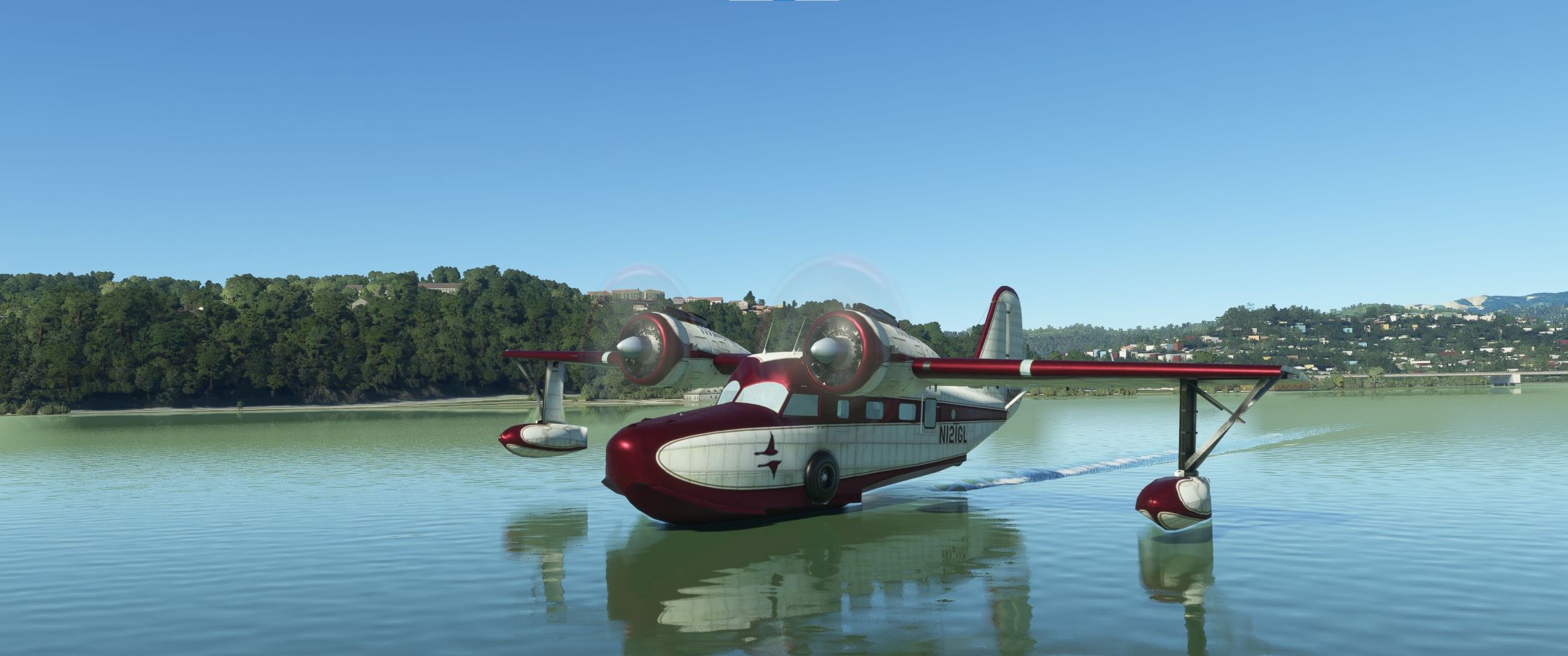
Description
Grumman Goose G21A Redux II Realism Mod
This is a modification to the excellent Grumman Goose G21A Redux II aircraft previously created as freeware by @ozWookiee. This mod is primarily aimed at improving the flight dynamics and water performance of this aircraft, providing a more realistic flying experience that is much closer to the actual aircraft. This beautifully modelled, uniquely versatile amphibious aircraft is easy to fly from both the land and the water, and learning to fly it successfully is a lot of fun. In addition to the flight model improvements, the engine no longer stalls at idle, the MSFS water wake and spray effects are now visible, and the aircraft can now be realistically steered in the water using either the rudder or differential engine power.
Multiple changes have been made to the engine and flight model parameters, the flotation contact points, and the aircraft weight and balance, which are all detailed in the Change Log file included under the Documentation folder. Some helpful tips for operating this aircraft are also included in the Flight Notes file under the Documentation folder.
Since it is basically a boat with wings, this aircraft may look a little strange and awkward on land when compared to a typical GA aircraft, but its outstanding performance both in the air and on the water more than make up for its strange looks. It's simple, but highly functional design was actually way ahead of its time. With two powerful 450 hp radial engines, a top speed of over 200 mph (175 kts.) and a useful load of over 2500 lbs., coupled with its ability to operate from both land and water, and easily taxi up onto any boat ramp or beach , it is uniquely suited for transporting both passengers and cargo to many otherwise inaccessible remote locations in the world.
This mod now includes the complete aircaft, so it is no longer necessary download and pre-install the original aircraft. To install this mod, simply unzip the download file and copy the entire mge-ozx-aircraft-goose-hd folder into the MSFS Community folder. To uninstall the mod, simply remove it from the Community folder.
Microsoft Flight Simulator © Microsoft Corporation. Grumman Goose G21A Redux II Realism Mod was created under Microsoft's "Game Content Usage Rules" ( https://www.xbox.com/en-US/developers/rules ) using assets from Microsoft Flight Simulator, and it is not endorsed by or affiliated with Microsoft.
Grumman Goose G21A Redux II Realism Mod
This mod is primarily aimed at improving the flight dynamics and water performance of this aircraft, providing a more realistic flying experience that is much closer to the actual aircraft.


Avis des utilisateurs
15 avis
Historique des versions
Version 2.0.0 ⦁ The complete original aircraft is now included in this mod download... It is no longer necessary to download and pre-install the original aircraft and then overwrite the original files with the mod. To install it, simply copy and paste the entire "mge-ozx-aircraft-goose-hd" folder from the mod download into the COMMUNITY folder. To uninstall it, remove it from COMMUNITY. Since this is now a complete stand-alone aircraft, it should correct any previously reported installation and upgrade compatibility issues.
Similaires
Asobo C172SP AS1000 Realism Mod
Enhance the flight dynamics of the Asobo C172SP AS1000 aircraft with this mod, which also includes the FLOATS and SKIS variant. This modification aims to provide a more realistic flying experience by adjusting engine and flight model parameters, weight, and balance. Detailed documentation and real-world training guides are included for easy installation and compatibility with other mods.
par MGouge425
Asobo Baron G58 Realism Mod
Enhance the realism of the Asobo Baron G58 in MSFS 2020 with this mod. Improvements to the flight model provide a more authentic flying experience, closely matching the performance of the actual aircraft. Easily install the mod by copying the folder to the Community folder, and enjoy the detailed changes listed in the documentation. Note: Only compatible with MSFS Deluxe Edition and Premium Deluxe Edition.
par MGouge425
Asobo B747-8i Realism Mod
Enhance your Boeing 747-8i experience with this realism mod for the MSFS 2020 default aircraft. This modification focuses on improving the flight model to closely match the actual aircrafts performance. Detailed changes can be found in the included documentation, addressing bugs like the landing gear failure. Easily installed by transferring files to the Community folder, this mod aims to provide a more authentic flying experience.
par MGouge425
Asobo Icon A5 Realism Mod
Enhance your flying experience with the Asobo Icon A5 Realism Mod for MSFS 2020. This mod focuses on adjusting the flight model and performance of the default Icon A5 to align it more closely with the real aircraft. From improved flight parameters to enhanced weight and balance, this mod offers a more authentic and satisfying flight experience. Easily install this mod to enjoy a more realistic flying experience with the iconic and versatile Asobo Icon A5 aircraft in Microsoft Flight Simulator.
par MGouge425
Connectez-vous pour participer à la discussion
Se connecterCommentaires(87)
3 months ago
6 months ago
7 months ago
7 months ago
7 months ago
https://flightsim.to/file/5529/grumman-goose-n2751a-alaska-airlines
https://flightsim.to/file/5497/grumman-goose-n323-catalina-air-lines
7 months ago
(Very sad that this old Lady cannot be used in MSFS2024)
7 months ago
7 months ago
about 1 year ago
7 months ago
over 1 year ago
I have re-downloaded all files multiple times with no luck.
https://youtu.be/WQedo2RJeCQ
over 1 year ago
1) Remove everything from COMMUNITY
2) Start MSFS 2020 and open OPTIONS / GENERAL OPTIONS / DATA
3) Select DELETE ROLLING CACHE FILE
4) Shutdown MSFS 2020 (Use Task Manager for complete shutdown)
5) Reboot the PC.
6) Reinstall the aircraft and mod into COMMUNITY.
7) Start a flight to see if it works.
8) Restore the ROLLING CACHE settings as required.
7 months ago
over 1 year ago
I have reinstalled multiple times with no luck. Base Goose mod works, with out the radio stack or auto pilot working correctly.
over 1 year ago
over 1 year ago
I take the OG download and put it in the community folder. I then take the mod and copy it to the community folder letting it overwrite any files it needs. But not working.
This is the same process I followed a few years ago when I first downloaded this mod.