
Description
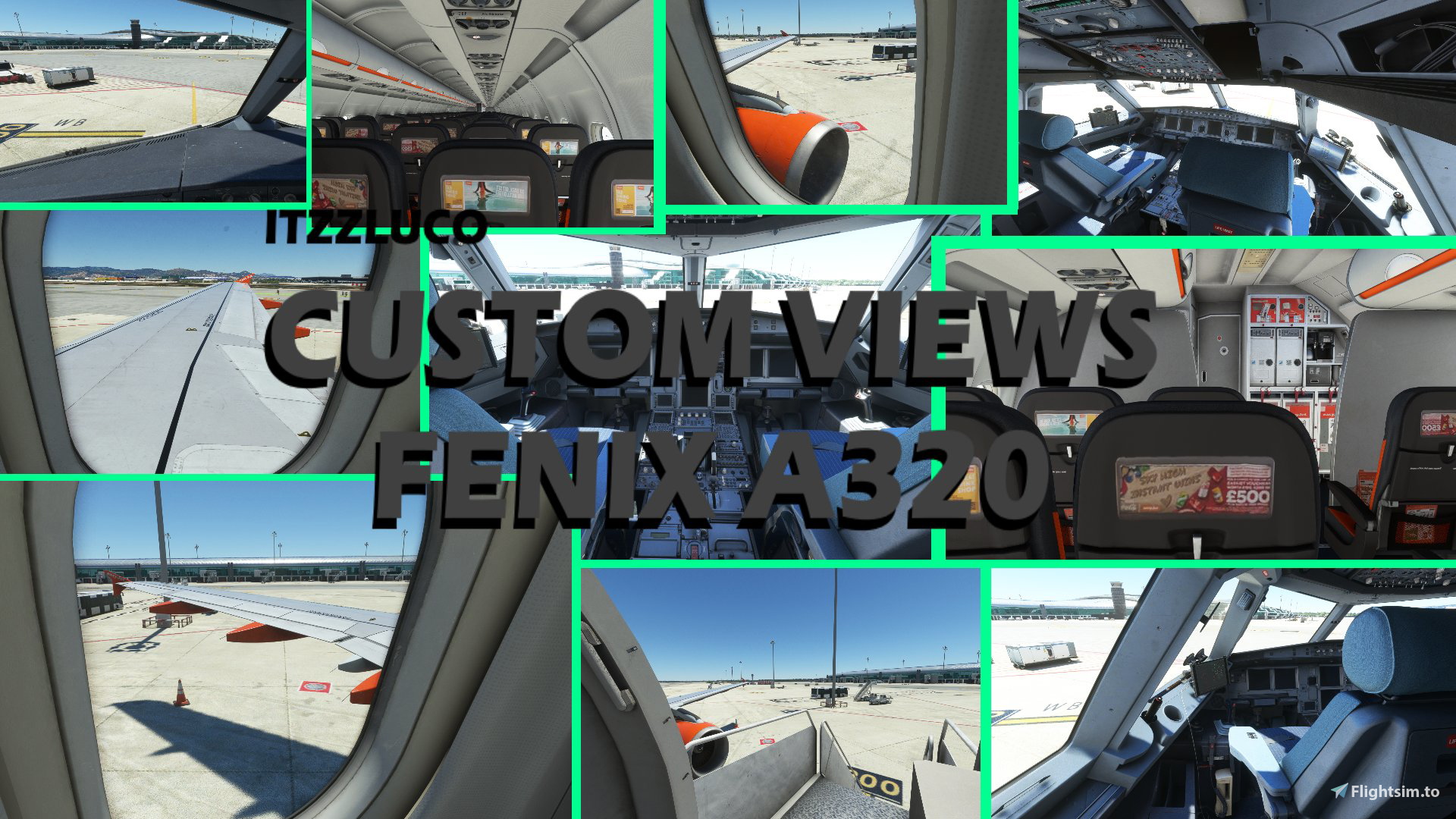
Here are Custom Camera Views for the "Fenix Simulations A320". Have Fun with it! ✈️
The different Views:
0 - Cockpit Front
1 - Cockpt 1
2 - Cockpit 2
3 - Cockpit 3
4 - Entrance
5 - Cabin Front
6 - Wing 1
7 - Wing 2
8 - Wing 3
9 - Cabin Back
++ Of course you can also see the views in the pictures ++
++ I do not implementet many Cockpit Views (for example: Overhead panel View) because you can reach every Cockpit view easily with: CRTL + 1-9 ++
Make sure that you have set the custom camera views in the settings.
In Game: --> Options/ Controls/ "Your Device"/ Camera/ Cockpit Camera/ Load Custom Camera 0-9
How to Install?
1. Download and UnZip the Folder and Copy the downloaded "cameras.cfg" file
2. Search "fnx-aircraft-320" Folder in your Community Folder :
3. Then in this Folder, Follow this Path: SimObjects\Airplanes\FNX320
3. Now replace the existing cameras.cfg with the new downloaded cameras.cfg
! Make sure, that you make a Backup from the normal cameras.cfg before you replace it. In case you want back the normal camera settings !
This should actually work without any problems!
But if if there are any problems I can try to help you, but I cannot insure you and I do not assume any liability ...
++ So do it on your own risk ++
And now have Fun with your new Custom Camera Views!
Itzzluco
FENIX A320 - Custom Views
Custom Camera Views for the Fenix Simulations A320 aircraft, including various cockpit, cabin, and wing perspectives for an enhanced flying experience. Easily accessible views through shortcut keys for seamless navigation within the aircraft. Instructions provided for installation to personalize your flight sim experience. Explore different angles and immerse yourself in the details of the A320 with these custom camera views.

Avis des utilisateurs
1 avis
Historique des versions
Aucun historique de version disponible.
Connectez-vous pour participer à la discussion
Se connecterCommentaires(6)
about 2 years ago
about 3 years ago
EDIT: Pilot error, "Camera views are not installed via the Community folder, so if you put them in there nothing will happen.
Instead they are installed in the Airplanes folder in appdata.". Oops.
over 4 years ago
Did everything correctly but nothing happens when I push 1 to load custom view 1?
about 4 years ago
same
over 4 years ago
nice!
over 4 years ago
Nice