Flightsim.to
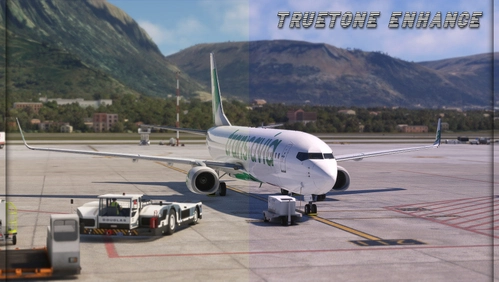
    [reshade.me] Realistic Filter (V2) - Image 1

    Description

    Many ReShade presets on this website require you to manually adjust parameters using the Nvidia game overlay filters. However, a simpler method is to use the ReShade application directly.

    I have done my best to create a realistic-looking preset by adjusting the overall color, reducing mist, sharpening objects, and making other enhancements. I will also update this file whenever I make new changes to the preset. 

    Thank you, and happy flying!


    The application used;
    https://reshade.me/

    How to install (steam version):

    • Download the RFilter preset
    • Download ReShade (I suggest downloading the one with full add-on support)When selecting the rendering API make sure to select DirectX 10/11/12 and DISABLE OPENXR!!
    • When ReShade asks for effects to install go to the very bottom; here select the path to the RFilter preset.
    • Put the downloaded preset (the INI file, not the ZIP) into (Program Files (x86), steam, steamapps, common, MicrosoftFlightSimulator2020)
    • Done! (HOME is the standard button to open reshade)


    How to install (MS version):

    • https://www.reddit.com/r/MicrosoftFlightSim/comments/15hcr8a/reshade_for_ms_store_version/?rdt=41451&onetap_auto=true&one_tap=true


    If something is wrong with the preset/you have any questions about installing or using ReShade, leave a message!

    Questions fréquemment posées

    Connectez-vous pour participer à la discussion

    Se connecter

    Commentaires(31)

    over 1 year ago

    Installed the 2024 version of the simulator. I like the picture quality, but every time I exit the flight (to the main menu, restart the flight) I am thrown to the desktop. What could be the problem?

    over 1 year ago

    Thats almost normal. The 2024 is a little Diva sometimes :D

    almost 2 years ago

    Work for 2024?

    about 2 years ago

    No Words, Just Wow, looks absolutely great! Thx

    about 2 years ago

    This preset gives me an extremely oversaturated image that's literally blinding me.
    What is wrong with people?!.......

    about 2 years ago

    dose this addon work?

    about 2 years ago

    This looks great! Only issue is that its very Megenta for me..Is there a way to reduce that colour?
    rdolfinAuthor

    about 2 years ago

    You can always play with the effects and change it however you like

    over 2 years ago

    Is it working with the Framegen mod?. I used to use this but with framegen mod frames go to the toilet, totally unplayable. Now I use Nvidia Filters for that reason, but never got to get it the same level of realism as I did with this reshade.
    rdolfinAuthor

    about 2 years ago

    I have been using the lossless scaling application instead of the framegen mod. It allows reshade to be used and even increases the fps levels by 3x. Def. recommend checking it out.

    over 2 years ago

    Superb filter! Thanks a lot for this.

    over 2 years ago

    looks really good

    over 2 years ago

    So i need to put the reshade filter file path when resgade asks for effects, and then copy that reshade filter file in the content folder?

    over 2 years ago

    May i please have some help installing this please.
    rdolfinAuthor

    over 2 years ago

    Message me on Discord; BlueFlask

    over 2 years ago

    I really like this

    over 3 years ago

    Hoping someone can help as mine will not load ColorLab or MagicHDR. Also I had to manually check the fx when I loaded in (even though I had the preset selected).

    over 3 years ago

    I really love this reshade, was wondering though the magenta colors are a bit off on mine? I have ReShade 5.8

    over 3 years ago

    OK.

    MSFS 2020MSFS 2024

    [reshade.me] Realistic Filter (V2)

    [reshade.me] Realistic filter, sharpening effects, colour blending and more

    Téléchargements9K
    Version2
    Taille du fichier4.52 KB
    PubliéIl y a 4 ans
    Mis à jourIl y a 2 ans

    Avis des utilisateurs

    4.7

    10 avis

    5
    90%
    4
    0%
    3
    0%
    2
    0%
    1
    0%

    Historique des versions

    This version features reduced sharpening, subtle color tweaks, and new effects. It combines elements from my TrueTone Enhanced file with the original file, making it my best preset yet.
    Similaires