
Description
Place included package folder named: airport-knyl-yuma in the Packages/Community folder applicable to your MSFS installation.
This scenery package contains enhancements to existing scenery for MCAS Yuma/Yuma International Airport as follows:
- Correction to ILS 21R Approach alignment.
- Replacement of all taxiway and runway signage.
- Creation and addition of custom DASR Radar model.
- Creation and addition of custom PAR antenna model.
- Creation and addition of custom TACAN antenna model.
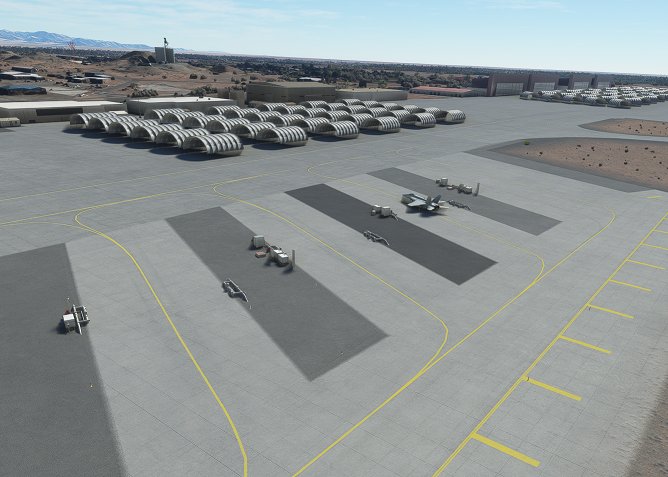
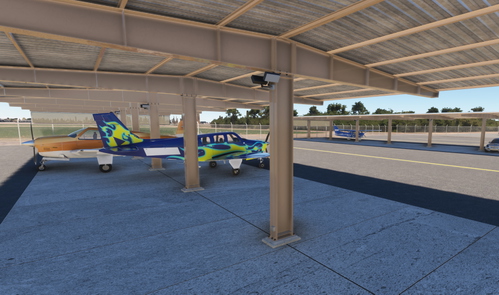
- Creation and addition of custom T Shade aircraft parking models.
- A-Gear motor placement (Native MSFS Models).
- Some minor building and hangar placements (Native MSFS Models).
- Some enhancement to vehicle parking at terminal (Native MSFS Models).
- Addition of refueling areas: GA Ramp Self Serve and Military Fuel Pits.
- Re-arrangement and addition of aircraft parking:
- North Parking = Customs
- Gate = Terminal
- Northeast Parking = Military Ops and North (Rotor Wing) Fuel Pit
- East Parking = Military Parking Lines and Fixed Wing Fuel Pit
- Southeast Parking = Military North CALA
- South Parking = Military South CALA
- West Parking = T Shades, Million Air FBO, Hero Hangars, and Care Flight
- Northwest Parking = Northwest Hangars
- Improve taxiway lighting.
- Addition of some water towers and water tanks (Native MSFS Models).
- Addition of some ground personnel at parking spots (Native MSFS Models).
- Addition of ramp lighting (MSFS Models).
- Some landcaping to hide MSFS auto generated infield asphalt, which is incorrect.
Primary initial goal was to re-align the ILS localizer signal that was off by a few degrees. Secondary goal was to correct some missplaced and incorrect signage, which ended up being an entire replacement of taxiway and runway signage. Sign proofreading and editing is ongoing for improvement. This scenery is not yet intended to be a complete visual re-creation of the airport and this scenery still relies on many auto-generated buildings and other automatically generated objects.
Future attention will be to create realistic hangars and buildings to replace the basic models placed on the airfield as well as to replace some auto-generated buildings. Additional landscaping will be included later to roughen up and otherwise enhance the auto-generated airfield layout.
Existing issues for future improvement are:
- Fuel trucks can be slow to respond due to extended travel distances. Enhancements pending.
- MSFS ATC only taxis departures to the main parallel runways but this seems to be a generic MSFS issue. Troubleshooting continues.
- Limitations on ramp naming conventions for ATC. Use the list above for ramp selection when using MSFS ATC.
- Interaction of adding an airport over existing airport erases many painted lines on the ramps. This will require manual painted line placement later.
- Auto generated landscaping is too crisp and visually unrealistic. This will be enhanced soon.
- Taxiway light spacing on long straigh routes needs to be adjusted for wider spacing.
The following channels on YouTube are credited and are great sources of instruction on using the MSFS SDK Editor: MyPhisicalWorld, Flying Theston, BennyBoy444, and Federico Pinotti.
Model texturing created using texture assets from ambientCG.com (CC0), cgbookcase.com (CC0), sharetextures.com (CC0), TextureCan.com (CC0), and some of my own.
Location
KNYL MCAS Yuma, Yuma International Airport
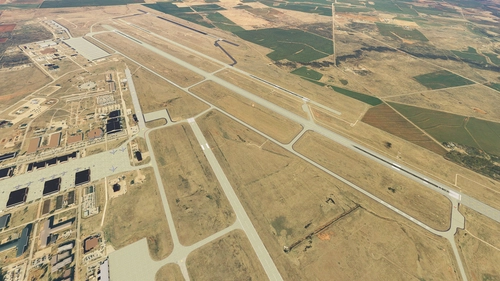
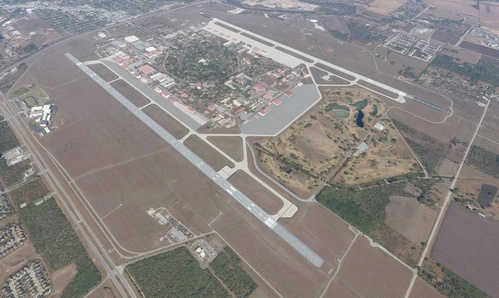
Scenery includes enhancements to Yuma Airport auto-generated scenery. This enhancement primarily was initially created to correct ILS alignment and to correct taxiway and runway signage. New models were created for Airport Surveillance Radar, Precision Approach Radar, TACAN, and T Shade Parking. Other enhancements are included and/or pending.


Avis des utilisateurs
12 avis
Historique des versions
2.4 Update Made several improvements for those using this scenery in MSFS2024, which seems to work well. Adjusted positions of loaders at Terminal for GSX optimization. Added custom shade hangar model for military ramps, which brings them into MSFS2024 also. Added additional shade hangars to military ramp to conform with real world changes. Added more parking spots on military ramp. Added more illumination to military ramp. Added Clearance Delivery frequency. Added taxiway lights to F1 Taxiway, which is a real world change. Changed Precision Approach Radar model to modern USN/USMC PAR system, which is a real world change. Fixed (removed) auto generated buildings appearing in aircraft shades on military ramp. Turned off Runway 35 REIL due to real world runway closure. Turned off Runway 17 PAPI due to real world runway closure. Added improved overrun for Runways 21R and 3L due to real world changes. Tweaked surface elevation around several civilian hangars to reduce the floating hangar effect. Improved surface elevation at Base Ops. Removed unwanted trees and rocks near Base Ops and VAL buildings. Improved some military parking taxiway center and edge lines. Improved appearance of taxiway center line lighting on Taxiway Charlie. Fixed surface blemish at intersection of Taxiways F, N, and M, which only appeared on MSFS2024. Improved position and elevation of taxiway sign at Taxiway F and C intersection. Improved Pad 4 white edge lighting. Added double blue taxiway lights at end of Pad 4 taxiway where it joins F taxiway. Removed tall powerlines from appearing on base. This removal is not working in MSFS2024. Improved elevation in several taxiway lights and signs. Notes: 1. Real life Runway 17/35 closed but edge lights will remain working for taxiing purposes. Closure markings not yet present. 2. Once a good freeware or free MSFS F35 model is located, it will replace the F18 static positions. 3. Ongoing project is to improve Level of Detail (LOD) characteristics in all custom models for MSFS2024 LOD compliance.


Connectez-vous pour participer à la discussion
Se connecterCommentaires(41)
2 months ago
2 months ago
2 months ago
10 months ago
11 months ago
11 months ago
Some of eh aircraft shelters have had auto-gen buildings spawn under them. I've provided an image. Some of the static F/A-18s also have landing lights on.
12 months ago
over 1 year ago
over 2 years ago
https://flightsim.to/file/69527/knyl-yuma-yuma-international-airport-gsx-profile
over 2 years ago
almost 3 years ago
almost 3 years ago
Love the dedication! Thank you so much
almost 3 years ago
Semper Fi!
about 3 years ago
5 stars, hands down as-is, and looks like you keep improving and updating it too. I love it!!!
about 3 years ago
about 3 years ago
about 3 years ago
about 3 years ago
about 3 years ago
about 3 years ago