
Description
!!! This App is no more supported because I implemented its function into another app. Please search for FlightSimServer and use this application (much more functions and useable with all devices in your network which have a webbrowser installed)!!!
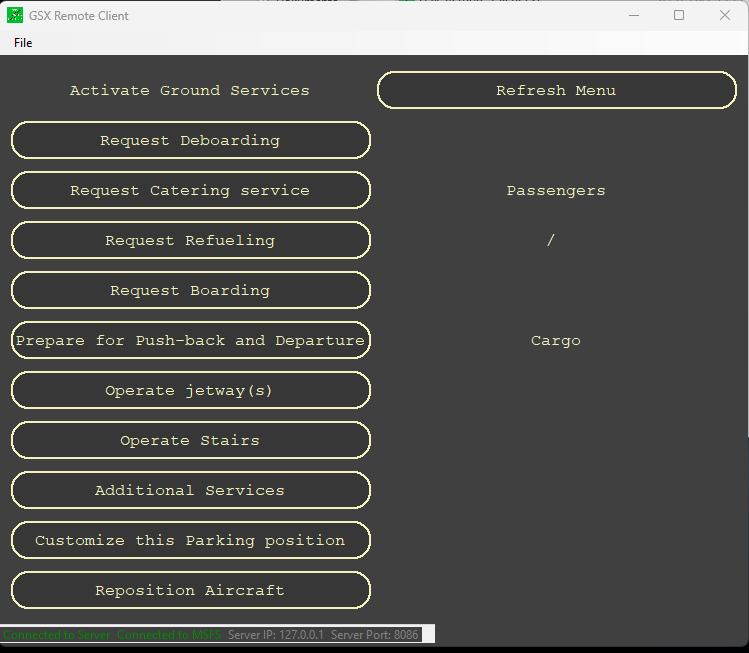
This is an application to control GSX over a client PC. It consits of two parts. A server and a client application.
The server must be installed on your MSFS PC (FSUIPC 7 is required).
The client can be installed on every PC in your network.
You choose the server or client installation in the setup.
Supports MSFS and Prepar3d.
If you have Version1.0.2 installed and use the software with MSFS you don't need to update to 1.1.0. There are no changes regarding MSFS.
GSX Remote
!!!! This App is no more supported because I implemented its function into another app. Please search for FlightSimServer and use this application (much more functions and useable with all devices in your network which have a webbrowser installed)!!!!


Avis des utilisateurs
3 avis
Historique des versions
Compatibility to MSFS SU12 and current Version of FSUIPC(7.3.19) and GSX(2.4.4)
Connectez-vous pour participer à la discussion
Se connecterCommentaires(23)
about 2 years ago
about 2 years ago
Please notice that this app is no more supported. I recommend to use the FlightSimServer instead of this app. It also includes the GSX Remote and many more features.
over 2 years ago
I wonder what the selected option GSX Remote from the menu trickers FSUIPC7 to give this error?
Please advise on this!
over 2 years ago
The GSX Remote app is no more supported from my side. But it is included in the FlightSimServer.
over 2 years ago
Problem solved by updating FlightsimServer and blocking Firewall which was culprit for runtime error. Now everything is working no messages anymore.
almost 3 years ago
about 3 years ago
If you start the client for the first time you have to enter
the servers IP Address: "
Where do I see the IP? What IP is this?
about 3 years ago
it is the IP of your PC running the GSX_Remote_Server application.
about 3 years ago
settings -> network and internet -> ethernet -> IPv4-Address
over 3 years ago
I take it you cant connect to it via an android tablet since you cant install the client software for it
over 3 years ago
Hi, thats correct. But if you want to control via Android tablet, you can download another app I published. Search for FlightSimServer in flightsim.to.
With this app you can control gsx (and many other things) from any client in your network using a webbrowser.
over 3 years ago
The client connects to the server, and replicates correctly the gsx menu on the server if I call it, but the menu buttons on the client have no effect. Any suggestion?
over 3 years ago
Hi, I am sorry you have problems with the App.
Which version of GSX Pro and FSUIPC is installed on your System?
I remember I had this problem one time, after restarting my server and client it worked again. I check next time I am on my simulator. Regards, Matthias
over 3 years ago
Hello,
Thank you for this wonderful tool. Now I can use it in my hardware cockpit. I just have one question. Can the "Menu" for the Simbrief Flightplan also be displayed and selected? I still have to open the normal GSX window normally because of this. Many thanks and best regards.
Translator
over 3 years ago
Hi,
I hat a look at it and I don't find a solution for it.
I am working on a Program that can handle this in another way. It imports your current SimBrief FlightPlan. It reads the number of Passengers and the Cargo load you entered in Simbrife. After that your aircraft is loaded automatic and if you open GSXRemote all needed informations are provided to GSX so that the number of passengers are walking to your aircraft. I never used the GSX Simbrief import function and so I also don't know what else this function is doing.
The most reason for my new App is, that you can connect with any device in your network that can open a webbrowser, for example Smartphone, Tablet, I-Pad...
If you are interested in testing this App I can provide you a beta to test the app and give me feedback. I need some days to test on my system, but on my programming PC it is working fine so far...
Regards, Matthias
over 3 years ago
Hello, 1000 x thanks for this absolutely great tool; only with this "remote control" I can use GSX in my home cockpit in a meaningful way; I am happy about every further development! Thanks & many greetings Joerg (EDDL)
almost 4 years ago
The program don't start, He ask me to run in administrator mode but nothing. I have try to uninstall and install it but nothing change
over 3 years ago
Hi carrecedric,
sorry for the delayed answer, but I don't get any notification when someone is writing a topic to my program...
I am sorry to read that you have problems running my program. Normaly you don't have to run as administrator. Which program is not starting? The client or the server? Not starting means you don't see a window opening or the client and server are not connecting?
Have you setup your firewall? If the client and server are not connecting, for test you can deactivate your firewall and try again. If then you get a connection you have to setup your firewall. What firewall are you using? MS defender?
You can also send me an E-Mail or Whatsapp if you need more support. I send you my contact details via PM.
Regards, Matthias
almost 4 years ago
Hello!
i don’t get a connection! I have entered the right IP and the port is the same… no connection…
almost 4 years ago
Can we maybe chat somehow? That Programm would change a lot…!