
Description
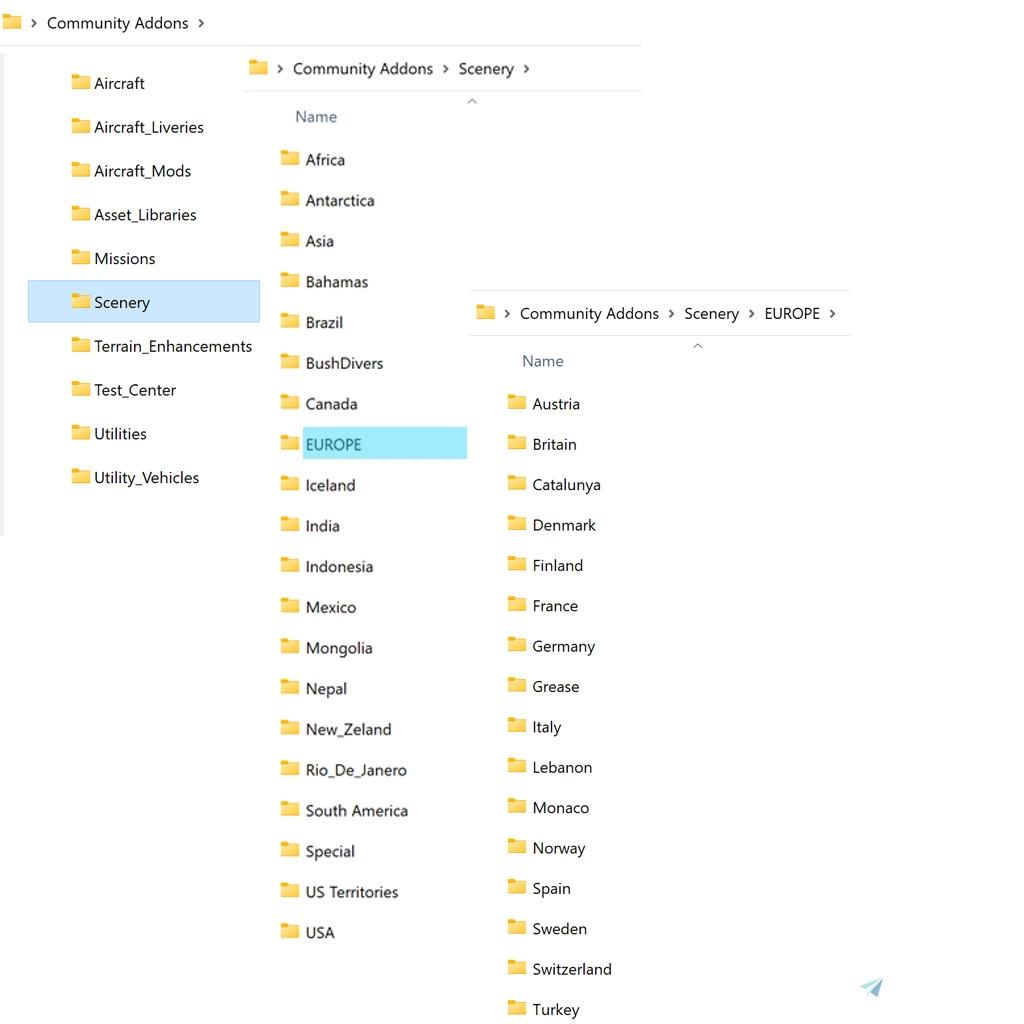
This is a ready-made directory folder, to be used with the ADDONS LINKER available here on Flightsim.to
I've had quite a few discusions with fellow Flightsimers about issues with the community folder in MSFS 2020. I always recommend the ADDONS LINKER mod, by bad2000, as do others!
Available here: https://flightsim.to/file/1572/msfs-addons-linker
One of the biggest questions is "... how do I set up my folders?"
Well here is a community wide answer... This is my basic Cataloge Library Setup. It is only the outline and contains no files... All you have to do is place the Communty Addons folder, on any drive you wish (Hopefully a Large one!) and when you set up the actual ADDONS LINKER, direct it to this storage folder, then just add all your addons to it and you are good to go!
If you find that you don't ever want to fly in the USA, or Europe, or maybe South America, then just delete that catagory from the folder, or maybe you want to expant your region of the world int sub-catagores, just add those files into the existing folder for your region.
As for my set-up, I have the Aircraft Livery Folder, further subdivided into various aircraft names.
This is just an empty Base Starting point, and you can use it a s a Guide, or whatever you wish...
There are other ADDON MODS, but I don't use them so I can't say whether this folder will work for them as well.
Hope it helps someone! AIRPAC1
AIRPAC1_ADDON LINKER Storage Folder Directory
Organize your MSFS 2020 addons effortlessly with the AIRPAC1_ADDON LINKER Storage Folder Directory. A community-recommended solution to streamline your addon management using the ADDONS LINKER mod. Simply set up this base folder structure on your preferred drive, customize it to your liking, and easily manage your aircraft liveries and addons. A convenient starting point for efficient addon organization in Microsoft Flight Simulator.


Avis des utilisateurs
2 avis
Historique des versions
Aucun historique de version disponible.
Similaires

gotfriends-savage-grravel livery packs
Multiple Livery Pack for Got Friends GRRAVEL Variant of the Savage Cub with 9 unique sets and 6 color variations. Features special designs and logo contributions from various creators, bringing a fresh look to your flights. Simply unzip and place in your Community Folder for immediate use.
par AIRPAC1

AIRPAC1 Van's RV7/7A Tangerine Livery Pack
Explore a collection of Tangerine liveries for the Vans RV7/7A aircraft with the AIRPAC1 Livery Pack. This pack includes fictional liveries for both models and requires the base aircraft by Deejing to be downloaded separately. Personalize your aircraft with unique registration numbers and enjoy a refreshed visual experience in Microsoft Flight Simulator.
par AIRPAC1

ASOBO PC-6 Factory Livery PACK
This fictitious Livery Pack for ASOBOs PC-6 Aircraft offers Factory White Liveries in FLOAT, SKI, and Wheel variants. Easily install the pack in your Community folder and enjoy a realistic touch with a picture of the real aircraft included. Special thanks to 270inc and ANNOV for making this set possible. Reach out with any feedback for further improvements.
par AIRPAC1

AIRPAC1-ABSOBO-Husky-A1C Livery Pack
A fictional, multi-color livery pack for ASOBOs A1C Husky, featuring three liveries available across all four variants. The update includes fixes for missing textures, matching prop spinners with livery colors, and adjustments to common textures. Please note this package is for liveries only and requires the aircraft from the MSFS Market Place. Install the pack in the Community Folder for a fresh look in the skies.
par AIRPAC1
Connectez-vous pour participer à la discussion
Se connecterCommentaires(8)
over 2 years ago
over 2 years ago
about 3 years ago
about 3 years ago
over 3 years ago
Theres a file dependancy function in add-ons linker, id like to understand how i can make the liveries dpendant on the aircraft chosen so only the liveries relevant to my chosen aircraft are used when I run msfs?
over 3 years ago
To be quite honest, I not used this function yet. I have set aircraft that I fly on a normal basis, as well as scenery, so it's not a problem, for me anyway, to just check mark the stuff I'm going to use, for a given session, and just turn it off in the next session... Old fashion I guess!
almost 4 years ago
thank you
almost 4 years ago
Thank you very much, this was on my todo list. You made my task much easier :-)