
Description
WHAT IS LAUNCH MANAGER
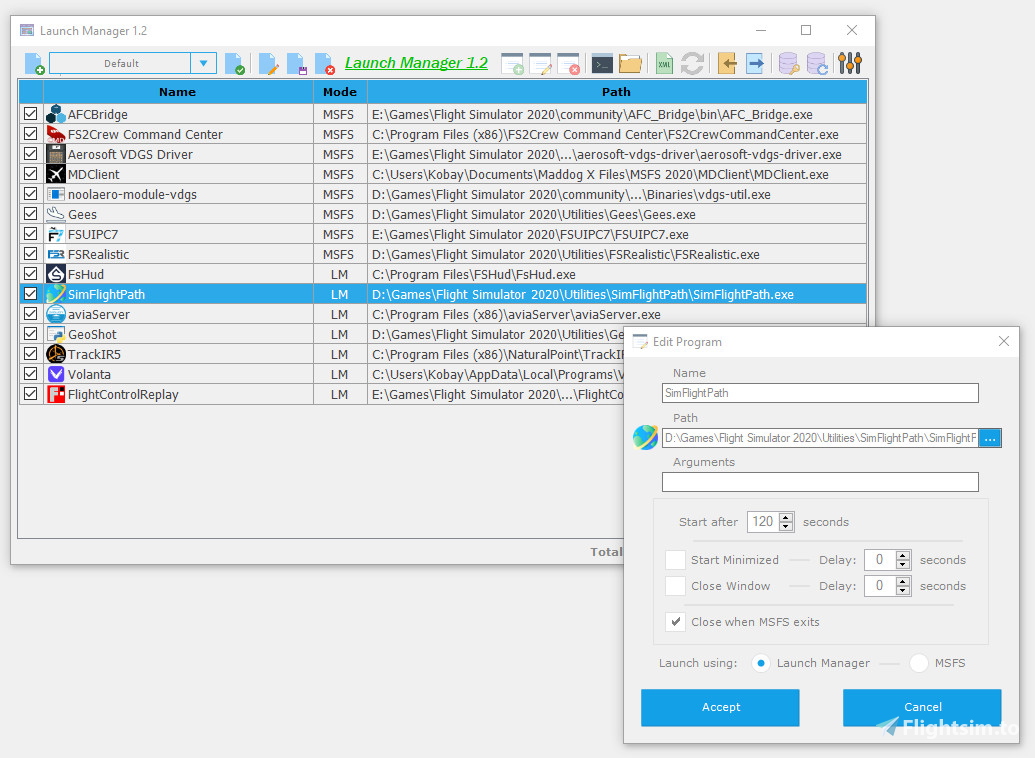
Launch Manager is a program designed to simplify the loading and execution of applications in Microsoft Flight Simulator.
Here is a detailed explanation of its key features:
* Add, remove, and modify programs that will execute when MSFS is loading.
* Create custom profiles.
* Export, import, and create backups for easy recovery in case of any issues.
* Set a time delay to start specific programs.
* Applications can be minimized or have their main window closed after a specified time.
(Some programs will close completely if you close their main window)
* Automatically close the applications when MSFS exits.
You can choose whether you want a program to run with Launch Manager or MSFS (exe.xml).
To add a new application, you can use the add button or drag & drop the applications into Launch Manager (even shortcuts).
To change the load order, simply drag the applications in the list.
HOW IT WORKS
When you open Launch Manager, it displays the applications from the 'exe.xml' file and creates a backup (if none exists).
(The 'exe.xml' file is used by Microsoft Flight Simulator to load custom modules and programs during startup)
When you add a new application, if you select to run it from MSFS, it is added to the 'exe.xml' file. If, on the other hand, you select to run it from Launch Manager, the route to the "LM.exe" file and a unique identifier for the application are added to the 'exe.xml' file.
"LM.exe" is the program that runs the applications with the established settings (delay start, minimize, etc.) and will remain open until MSFS is closed if the "Close when MSFS exits" option is set.
If you want to change the program profile without opening Launch Manager, you must first create the profiles you want. Then create a shortcut to Launch Manager using the profile name in quotes as a parameter.
(Example: "C:\Launch Manager.exe" "Profile 1")
NOTES
If an application does not minimize or close the main window, try increasing the delay time to 20 seconds or so. The window handle must be created before it can be minimized or closed.
DISCLAIMER
I created this program for my personal use, but I decided to share it in case it can be useful to others
I am not responsible if your computer decides to go up in flames, explode, implode, or spontaneously combust.
Use Launch Manager at your own risk.
Changelog Version 1.2
Improved (slightly) the detection system for the 'exe.xml' file.
Added settings to select 'exe.xml'.
Added settings to save window position and size.
Now accepts shortcuts (.lnk).
Minor fixes.
Launch Manager
Launch Manager simplifies program loading and execution in Microsoft Flight Simulator. It allows users to manage program loading, create custom profiles, and export/import backups for easy recovery. Launch Manager offers a time delay option to start specific programs and an option to automatically close a program when MSFS is exited. Adding programs is easy with the drag and drop feature.


Avis des utilisateurs
9 avis
Historique des versions
Improved (slightly) the detection system for the 'exe.xml' file. Added settings to select 'exe.xml'. Added settings to save window position and size. Now accepts shortcuts (.lnk). Minor fixes.
Connectez-vous pour participer à la discussion
Se connecterCommentaires(60)
about 1 year ago
See the end of this message for details on how to invoke Just-In-Time (JIT) debugging instead of this dialog box.
************** Exception Text **************
System.IO.IOException: The specified file could not be encrypted.
at System.IO.__Error.WinIOError(Int32 errorCode, String maybeFullPath)
at System.IO.File.InternalCopy(String sourceFileName, String destFileName, Boolean overwrite, Boolean checkHost)
in LaunchManager.FMenu.FMenu_Load(Object sender, EventArgs e)
in System.EventHandler.Invoke(Object sender, EventArgs e)
in System.Windows.Forms.Form.OnLoad(EventArgs e)
in System.Windows.Forms.Form.OnCreateControl()
in System.Windows.Forms.Control.CreateControl(Boolean fIgnoreVisible)
in System.Windows.Forms.Control.CreateControl()
in System.Windows.Forms.Control.WmShowWindow(Message& m)
in System.Windows.Forms.Control.WndProc(Message& m)
at System.Windows.Forms.Form.WmShowWindow(Message& m)
at System.Windows.Forms.NativeWindow.Callback(IntPtr hWnd, Int32 msg, IntPtr wparam, IntPtr lparam)
************* Loaded Assemblies **************
mscorlib
Assembly Version: 4.0.0.0
Win32 Version: 4.8.9310.0 built by: NET481REL1LAST_C
Codebase: file:///C:/Windows/Microsoft.NET/Framework64/v4.0.30319/mscorlib.dll
----------------------------------------
LaunchManager
Assembly Version: 1.2.0.0
Version Win32: 1.2.0.0
Codebase: file:///F:/Flight%20Sim%20External%20apps/Launch%20Manager/Launch%20Manager%201.2.exe
----------------------------------------
Microsoft.VisualBasic
Assembly version: 10.0.0.0
Win32 version: 14.8.9032.0 built by: NET481REL1
Codebase: file:///C:/WINDOWS/Microsoft.Net/assembly/GAC_MSIL/Microsoft.VisualBasic/v4.0_10.0.0.0__b03f5f7f11d50a3a/Microsoft.VisualBasic.dll
----------------------------------------
System
Assembly version: 4.0.0.0
Win32 version: 4.8.9310.0 built by: NET481REL1LAST_C
Code base: file:///C:/WINDOWS/Microsoft.Net/assembly/GAC_MSIL/System/v4.0_4.0.0.0__b77a5c561934e089/System.dll
----------------------------------------
System.Core
Assembly version: 4.0.0.0
Win32 version: 4.8.9297.0 built by: NET481REL1LAST_C
Code base: file:///C:/WINDOWS/Microsoft.Net/assembly/GAC_MSIL/System.Core/v4.0_4.0.0.0__b77a5c561934e089/System.Core.dll
----------------------------------------
System.Windows.Forms
Assembly version: 4.0.0.0
Win32 version: 4.8.9256.0 built by: NET481REL1LAST_B
Code base: file:///C:/WINDOWS/Microsoft.Net/assembly/GAC_MSIL/System.Windows.Forms/v4.0_4.0.0.0__b77a5c561934e089/System.Windows.Forms.dll
----------------------------------------
System.Drawing
Assembly version: 4.0.0.0
Win32 version: 4.8.9032.0 built by: NET481REL1
Code base: file:///C:/WINDOWS/Microsoft.Net/assembly/GAC_MSIL/System.Drawing/v4.0_4.0.0.0__b03f5f7f11d50a3a/System.Drawing.dll
----------------------------------------
System.Configuration
Version Assembly Version: 4.0.0.0
Win32 Version: 4.8.9032.0 built by: NET481REL1
Code Base: file:///C:/WINDOWS/Microsoft.Net/assembly/GAC_MSIL/System.Configuration/v4.0_4.0.0.0__b03f5f7f11d50a3a/System.Configuration.dll
----------------------------------------
System.Xml
Assembly Version: 4.0.0.0
Win32 Version: 4.8.9032.0 built by: NET481REL1
Code Base: file:///C:/WINDOWS/Microsoft.Net/assembly/GAC_MSIL/System.Xml/v4.0_4.0.0.0__b77a5c561934e089/System.Xml.dll
----------------------------------------
System.Runtime.Remoting
Assembly version: 4.0.0.0
Win32 version: 4.8.9214.0 built by: NET481REL1LAST_B
Code base: file:///C:/WINDOWS/Microsoft.Net/assembly/GAC_MSIL/System.Runtime.Remoting/v4.0_4.0.0.0__b77a5c561934e089/System.Runtime.Remoting.dll
----------------------------------------
System.Windows.Forms.resources
Assembly version: 4.0.0.0
Version Win32: 4.8.9032.0 built by: NET481REL1
Code base: file:///C:/WINDOWS/Microsoft.Net/assembly/GAC_MSIL/System.Windows.Forms.resources/v4.0_4.0.0.0_es_b77a5c561934e089/System.Windows.Forms.resources.dll
----------------------------------------
mscorlib.resources
Assembly version: 4.0.0.0
Win32 version: 4.8.9032.0 built by: NET481REL1
Base code: file:///C:/WINDOWS/Microsoft.Net/assembly/GAC_MSIL/mscorlib.resources/v4.0_4.0.0.0_es_b77a5c561934e089/mscorlib.resources.dll
----------------------------------------
************** JIT Debugging **************
To enable Just In Time (JIT) debugging, the configuration file for this application or machine (machine.config) must have the jitDebugging value set in the system.windows.forms section.
The application must also be compiled with debugging enabled.
For example:
When JIT debugging is enabled, any unhandled exceptions will be sent to the JIT debugger registered on the machine instead of being handled through the dialog box.
about 1 year ago
It don´t load some configured programs, for example: '.cmd' and '.bat' files.
over 1 year ago
over 1 year ago
over 1 year ago
almost 2 years ago
almost 2 years ago
For example - Setting up Launch Manager.exe to C:\ and create/save a profile called "Profile 1". Then using the shortcut ("C:\Launch Manager.exe" "Profile 1") as described in your instructions seems to nothing.
Seems unusual to just use a parameter enclosed in ""
Any ideas?
almost 2 years ago
almost 2 years ago
about 2 years ago
Die angegebene Datei konnte nicht verschlüsselt werden
over 2 years ago
Is it possible to add an "up"- and "down"-button and equivalent popup menu items to change the start order?
almost 2 years ago
over 2 years ago
almost 2 years ago
over 2 years ago
can you please help me out ? I run the program and it just stays minimized...
over 2 years ago
almost 3 years ago
about 3 years ago
if i click on continue , i can create a list of software to launch, but it is lost when i exit Launch Manager
it's a shame for me because it is something i need to have
i will keep focus on , maybe the next version will run for me
about 3 years ago
PJ