
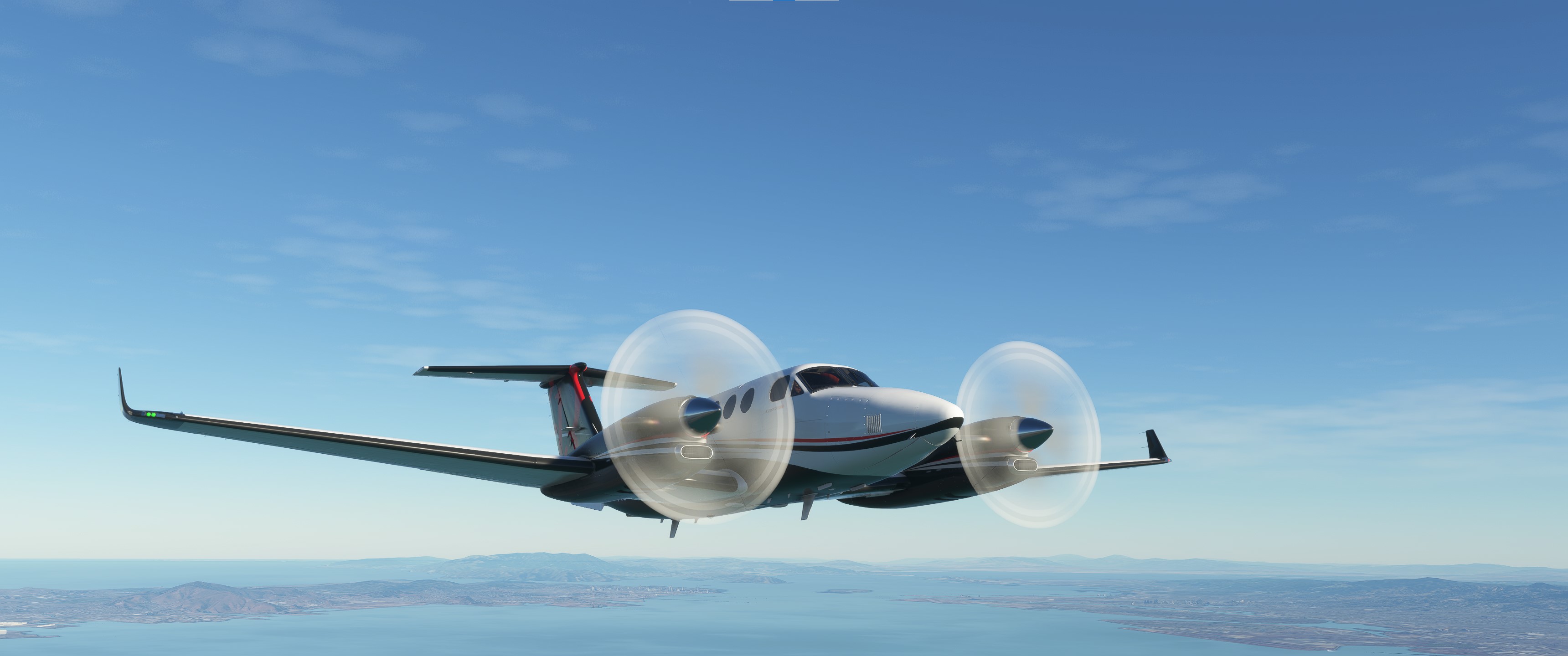
Description
This is a modification to the MSFS 2020 default Beechcraft King Air 350i aircraft and is primarily aimed at improving the aircraft flight model to make its overall performance more closely match the actual aircraft, providing a much closer experience to flying the real aircraft. Multiple changes have been made to the flight model and engine parameters, which are detailed in the Change Log file included in the download under the Documentation folder. This mod does not add any new features or functionality to the original default aircraft.
This mod is easily installed by simply unzipping the download file and copying the B300-asobo-aircraft-kingair350 folder to the MSFS Community folder. It will then replace the existing default Beechcraft King Air 350i aircraft in the MSFS aircraft selection screen, and will also continue to utilize all of the existing available Liveries. To uninstall the mod and return to using the MSFS default aircraft, simply remove it from the Community folder.
Microsoft Flight Simulator © Microsoft Corporation. Asobo King Air 350 Realism Mod was created under Microsoft's "Game Content Usage Rules" using assets from Microsoft Flight Simulator, and it is not endorsed by or affiliated with Microsoft.
Asobo King Air 350 Realism Mod
Enhance the realism of the default Beechcraft King Air 350i in MSFS 2020 with this mod. By adjusting the flight model and engine parameters, this modification aims to provide a more authentic flying experience. Simply install by unzipping the download file and enjoy a closer simulation to the real aircraft.


Avis des utilisateurs
6 avis
Historique des versions
Version 1.6.5 ⦁ The in-game CHECKLIST has been updated. ⦁ The Training Flight Plan (.PLN) files included under the FLIGHT PLANS folder have been updated. See the README file for instructions on installing these files.
Similaires

Asobo C172SP AS1000 Realism Mod
Enhance the flight dynamics of the Asobo C172SP AS1000 aircraft with this mod, which also includes the FLOATS and SKIS variant. This modification aims to provide a more realistic flying experience by adjusting engine and flight model parameters, weight, and balance. Detailed documentation and real-world training guides are included for easy installation and compatibility with other mods.
par MGouge425
Asobo Baron G58 Realism Mod
Enhance the realism of the Asobo Baron G58 in MSFS 2020 with this mod. Improvements to the flight model provide a more authentic flying experience, closely matching the performance of the actual aircraft. Easily install the mod by copying the folder to the Community folder, and enjoy the detailed changes listed in the documentation. Note: Only compatible with MSFS Deluxe Edition and Premium Deluxe Edition.
par MGouge425
Asobo B747-8i Realism Mod
Enhance your Boeing 747-8i experience with this realism mod for the MSFS 2020 default aircraft. This modification focuses on improving the flight model to closely match the actual aircrafts performance. Detailed changes can be found in the included documentation, addressing bugs like the landing gear failure. Easily installed by transferring files to the Community folder, this mod aims to provide a more authentic flying experience.
par MGouge425
Asobo Icon A5 Realism Mod
Enhance your flying experience with the Asobo Icon A5 Realism Mod for MSFS 2020. This mod focuses on adjusting the flight model and performance of the default Icon A5 to align it more closely with the real aircraft. From improved flight parameters to enhanced weight and balance, this mod offers a more authentic and satisfying flight experience. Easily install this mod to enjoy a more realistic flying experience with the iconic and versatile Asobo Icon A5 aircraft in Microsoft Flight Simulator.
par MGouge425
Connectez-vous pour participer à la discussion
Se connecterCommentaires(89)
about 1 hour ago
9 days ago
15 days ago
The discontinuity can be removed the same way on the G3x, but you must manually enter and ADD the Approach Transition waypoint as the last ENROUTE waypoint. It should then appear in the flight plan twice, once at the end of the ENROUTE section and again at the beginning of the APPROACH section... This should also be done to remove the discontinuity after the last "A" waypoint of a STAR, which is a Manual Vector waypoint.
19 days ago
21 days ago
20 days ago
21 days ago
To avoid this problem, use the following guideline when creating your flight plan route in the WORLD MAP, or when entering it directly into the G3x FMS...
1) Always manually ADD a VOR or FIX waypoint that is close to the desired Approach IAF waypoint to ensure that the WORLD MAP and ATC will assign the same Transition IAF waypoint.
about 1 month ago
about 1 month ago
about 1 month ago
about 1 month ago
1) IFR DEPARTURE CLEARANCE (flight plan) must be requested and acknowledged... This must be done before engine start.
2) IFR TAXI CLEARANCE must be requested and acknowledged... This must be done only after engine start.
3) IFR TAKEOFF CLEARANCE must be requested and acknowledged... This must be done only after stopping at the runway RED hold short crossing marks (put the nose wheel as close as possible to the marks).
4) Enable FLIGHT ASSISTANT/AI RADIO COMMUNICATIONS... This must be done after entering the runway and stopping at the THRESHOLD. It can also be done immediately after a RUNWAY start. Also, this option must first be turned OFF under OPTIONS/ASSISTANCE/PILOTING before starting the flight.
This sequence can be easily seen by reviewing the ATC window communications after a RUNWAY start. If it does get out of sync, it will continue to automatically tune the ATC assigned COM frequencies, but you will have to manually trigger the required acknowledgements by pressing [1] or selecting it in the ATC window.
about 1 month ago
about 1 month ago
about 1 month ago
about 2 months ago
about 2 months ago
Also, after clearing you to descend to Approach (IAF) altitude, ATC may instruct you to climb or descend again multiple times. You should also ignore these instructions and maintain Approach altitude until you intercept the GS.
about 2 months ago
about 2 months ago
2 months ago
You can also briefly press the [NUM DEL] key to evenly apply both brakes and prevent swerving while slowing down or stopping during taxi. To set the Parking Brake after stopping, continue to hold this key down and then tap the [CTRL] key.
2 months ago