
Description
12/28/2025 news : Still working with MSFS 2024 (tried only with Asobo A320 and FBW A320, if something doesn't work for a specific aircraft, please tell me in the comments below)
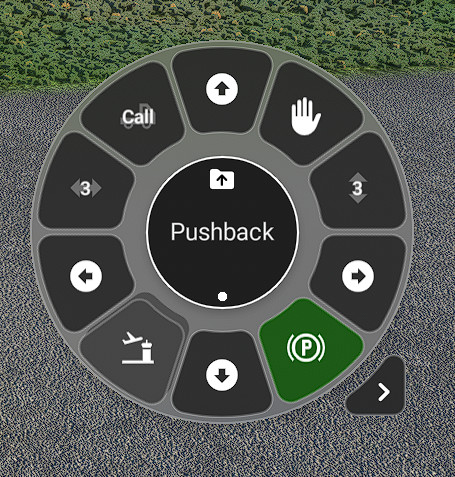
This Flow Pro wheel will provide you with everything you need to manage your pushback using your preferred add-on.
With this wheel, you will be able to :
- Call the tug and release it
- Move forward
- Move backward
- Turn left
- Turn right
- Toggle the parking brakes
- Halt the tug (without releasing it or setting the parking brake).
- Adjust the tug speed by scrolling on the double vertical arrow. You can reset it to the default value by clicking the button.
- Adjust the directional speed by scrolling on the double horizontal arrow. You can reset it to the default value by clicking the button.
You can also :
- Call and release the jetway
- Call and release the ramp
- Call the fuel truck
- Call the catering truck
- Call for luggage handling
- Call and release the external power supply
- Toggle aircraft doors: main, cargo, and rear. (Works only if the plane has openable doors)
Please ensure that you remove, disable, or uninstall any other pushback add-ons.
This add-on has been tested only with default Asobo aircraft and A32nx from FBW.
To install the wheel, please follow this link : https://parallel42.com/blogs/flow-documentation/importing-sharing-scripts
Finally, please let me know if you encounter any bugs or if you have any suggestions for improvements.
Know Issues :
- This add-on requires Flow PRO version 2026.33.5.13 PRO or higher. If you encounter any issues, please ensure that you have updated to the latest version of Flow Pro.
- Please note that this add-on may not function fully with third-party aircraft, such as:
̶A̶3̶2̶N̶X̶ ̶f̶r̶o̶m̶ ̶F̶B̶W̶:̶ ̶T̶h̶e̶ ̶p̶a̶r̶k̶i̶n̶g̶ ̶b̶r̶a̶k̶e̶ ̶t̶o̶g̶g̶l̶e̶ ̶i̶s̶ ̶n̶o̶t̶ ̶w̶o̶r̶k̶i̶n̶g̶,̶ ̶b̶u̶t̶ ̶a̶l̶l̶ ̶o̶t̶h̶e̶r̶ ̶p̶u̶s̶h̶b̶a̶c̶k̶ ̶b̶u̶t̶t̶o̶n̶s̶ ̶a̶r̶e̶ ̶f̶u̶n̶c̶t̶i̶o̶n̶i̶n̶g̶ ̶c̶o̶r̶r̶e̶c̶t̶l̶y̶.̶ ̶(̶W̶i̶l̶l̶ ̶b̶e̶ ̶f̶i̶x̶e̶d̶ ̶i̶n̶ ̶n̶e̶x̶t̶ ̶u̶p̶d̶a̶t̶e̶)̶
- PMDG 737 family: There have been reports that the backward pushback is not working correctly. However, the forward pushback is functioning well (although it may not be the most useful feature).
Note for MSFS2024 :
The simulator attempts to manage the pushback itself, including the directions (which is why we now have a pushback status that can be 1 for left and 2 for right). This mod allows you to move the aircraft independently of the simulator. However, once the simulator considers that the pushback has been sufficient, it removes the tug itself.
This is only visual; the pushback still works.
Unfortunately, I don't have control over this animation.
If you encounter any problems, please let me know. I greatly appreciate all feedback.
Flow Pro Widget - Pushback wheel
Enhance your pushback experience with Flow Pro Widget - Pushback wheel, enabling seamless control for managing pushback and ground services. This versatile wheel allows you to easily maneuver your aircraft, call for various services like jetway and catering, and adjust tug and directional speeds. Ensure to use with default aircraft or A32nx from FBW, and update to the latest Flow PRO version for optimal functionality. Personalize your ground operations and provide feedback for continuous improvements.




Avis des utilisateurs
10 avis
Historique des versions
- Do not cancel the pushback when the pushback status changes to 1 or 2 (left or right). Note for MSFS2024 : The simulator attempts to manage the pushback itself, including the directions (which is why we now have a pushback status that can be 1 for left and 2 for right). This mod allows you to move the aircraft independently of the simulator. However, once the simulator considers that the pushback has been sufficient, it removes the tug itself. This is only visual; the pushback still works. Unfortunately, I don't have control over this animation.
Similaires
Flow Pro Widget - Reset Kodiak 100 Engine
Reset your Kodiak 100 engine with ease using the Flow Pro Widget. Quickly recover from engine failures, fires, or other critical issues mid-flight without the need to exit to the main menu. Monitor engine condition and reset state on the fly to avoid crashes, all within the simulator interface.
par Damgot
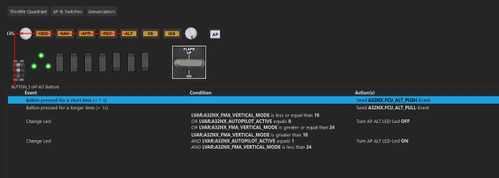
FlyByWire A32NX Honeycomb Alpha + Bravo Spad.Next profile
This add-on provides a comprehensive profile for the FlyByWire A32NX compatible with HoneyComb Alpha and Bravo flight controllers. It includes fully functional features such as throttle reverse positions, an operational FCU with annunciators, and working light switches. The profile also outlines specific button mappings and required axis calibrations for optimal performance, ensuring a streamlined experience for A32NX users.
par Damgot
Connectez-vous pour participer à la discussion
Se connecterCommentaires(39)
3 months ago
about 1 month ago
First be sure to use the last Flow Pro version (you need the pro version, not the essential). The current latest version is Flow 2026.33.5.13 PRO.
Then extract my widget to the root of your “community” folder.
Finally, start MSFS2024 (or restart it) and you will find my widget in Flow under "Community Widgets" then "By Damgot".
4 months ago
8 months ago
8 months ago
One is "Community\Community", it's the correct one.
The other one is "Community\Community2024", but it's not used.
Also, be sure not to include any extra folders in the hierarchy.
The correct hierarchy must be : Community\p42-util-flow-Damgot-flow-pushback\manifest.json.
Be sure to not have 2 p42-util-flow-Damgot-flow-pushback folders (something like "Community\p42-util-flow-Damgot-flow-pushback\p42-util-flow-Damgot-flow-pushback\manifest.json)
Finally, if everything is good in the community folder, start the game and open the Flow pro tile editor (or wheel editor, I don't know the correct name), here you need to enter the name of the package to load it (it's no longer load automatically, but you only need to do it once, not everytime you start the game) under the "community widget". Just enter "p42-util-flow-Damgot-flow-pushback" (or copy/paster) and click on the "+" button.
After that, the pushback tool must be available in the "By damgot" flow folder
8 months ago
I just want to say it works good with the PMDG 737-800 fs2024, for now i didn't have any trouble.
Once again, very great and good work. Congratulations
9 months ago
I monitored the simvar "A;PUSHBACK STATE". When pressing "call", it changes from 3 to 0. But later on in the push, it changes to 2. That's when the "called" button changes. (Default EGKK stand 53 is an example of where it happens).
9 months ago
Thanks
9 months ago
Thanks again to reported it
9 months ago
9 months ago
Thank You.
9 months ago
Thanks to you
10 months ago
This is the BEST Pushback app available, PERIOD.
10 months ago
10 months ago
over 1 year ago
over 1 year ago
You can follow this : https://parallel42.com/blogs/flow-documentation/importing-sharing-scripts
about 2 years ago
over 2 years ago
over 2 years ago