Flightsim.to

    User ContentFlow Pro Widgets

    Browse Flow Pro Widgets user content for Microsoft Flight Simulator 2024 and 2020. Parcourez 83 add-ons publiés par notre communauté.

    Dernière mise à jour
    QuietCockpit

    QuietCockpit

    QuietCockpit is a Flow Pro utility for Microsoft Flight Simulator 2024 that allows dynamic adjustment of the cockpit sound volume from the Flow wheel, while maintaining your chosen external-view volume. It is particularly useful for users who prefer loud flybys but want quieter cockpit audio, especially in fast jets and warbirds. The add-on works by controlling the MSFS app volume in Windows and offers a simple installation process with adjustable targets saved between sessions. QuietCockpit requires MSFS 2024, Flow Pro, Windows PowerShell 5.1, and SimConnect SDK files.

    OzoneFly
    MSFS2020/24
    0.0(0)
    26
    16.6 KB
    9 hours ago
    SayPosition Widget

    SayPosition Widget

    SayPosition Widget is an overlay tool for Microsoft Flight Simulator 2024 that provides real-time VFR position reporting for UK airspace. It displays the nearest UK NATS visual reference point within 25 nautical miles or defaults to the closest airport when outside the UK or away from VRPs. The widget shows key information such as ICAO codes, bearings, altitude, and heading. Designed for compatibility with Flow Pro, it is aimed at those conducting realistic VFR operations and online ATC communications.

    OzoneFly
    MSFS2024
    0.0(0)
    25
    24.8 KB
    1 week ago
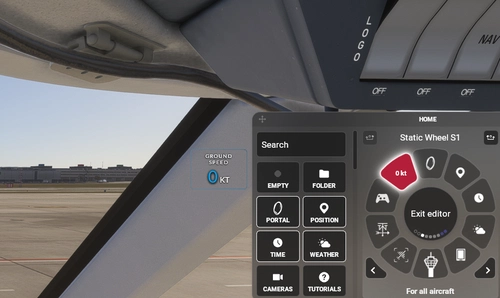
    Flow Pro Piper-J3C toggles

    Flow Pro Piper-J3C toggles

    This add-on provides a set of custom Flow Pro toggles for the Piper J3C from Classic Aircraft Simulation, enabling convenient control over door, window, and various aircraft features. Users can toggle the anchor, paddle, water rudder, and pitot cover, as well as noise reduction settings. The package includes a ready-to-import wheel setup for easy integration. Installation instructions are provided for adding the mod to your simulator setup.

    bagolu
    MSFS2020/24
    0.0(0)
    25
    8.8 KB
    1 month ago
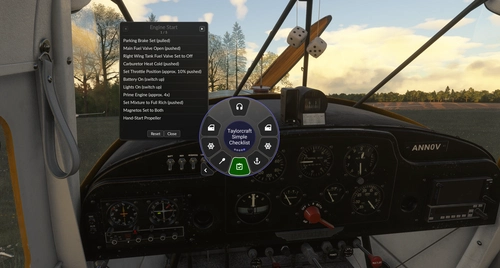
    Flow Pro Taylorcraft BC-12D - Simple Checklist

    Flow Pro Taylorcraft BC-12D - Simple Checklist

    This add-on provides a lightweight, movable checklist overlay for the Taylorcraft BC-12 in Microsoft Flight Simulator, integrated as a Flow widget. It covers basic procedures from engine start to engine shutdown across five pages. Steps can be marked as done, undone, or reset per page, and the overlay can be repositioned or closed as needed. The checklist is designed for quick in-flight reference, with progress resetting for each new flight session.

    ANN0V
    MSFS2020/24
    0.0(0)
    25
    11.8 KB
    1 month ago
    Flow Pro Taylorcraft BC-12D toggles

    Flow Pro Taylorcraft BC-12D toggles

    This add-on provides quick access toggles for the Taylorcraft BC-12D by Gotfriends, allowing control over door operation, yoke visibility, anchor and paddle activation, and noise reduction features. It is designed as a complete Flow Pro wheel setup. Users can import it into a dedicated folder for streamlined organization. Installation involves placing the files in the community directory and configuring within Flow Pro.

    bagolu
    MSFS2020/24
    5.0(3)
    36
    10 KB
    1 month ago
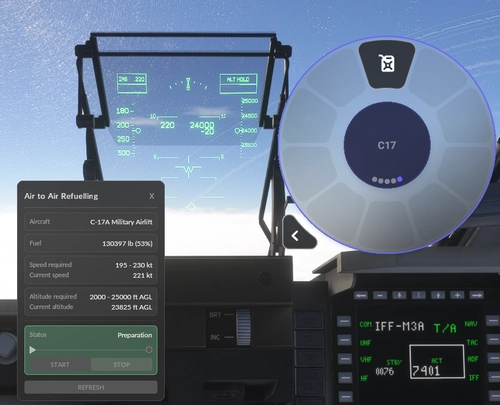
    Air to Air Refuelling (AAR) - Miltech C-17 Globemaster III

    Air to Air Refuelling (AAR) - Miltech C-17 Globemaster III

    This add-on transforms the Flow Pro wheel into an Air-to-Air Refuelling control panel for the Miltech Simulations C-17 Globemaster III. It simulates a multi-phase refuelling process, including realistic alignment, docking, connection, and live fuel transfer with animated feedback. The widget enforces operational speed and altitude limits, monitors safety throughout the process, and provides visual cues for each step. Configuration options for fuel limits and transfer rates are available within the script.

    kobiwaldi
    MSFS2024
    0.0(0)
    10
    15.8 KB
    1 month ago
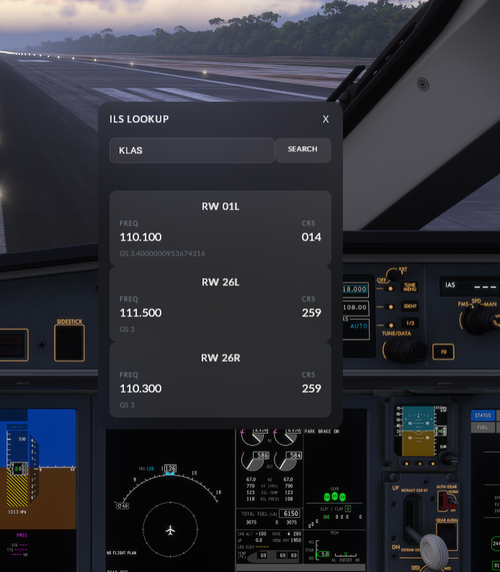
    Flow Pro ILS Lookup Widget

    Flow Pro ILS Lookup Widget

    This add-on provides a straightforward widget for Microsoft Flight Simulator, enabling users to look up ILS frequencies and localizer courses for any airport using its ICAO code. Simply drag and drop the widget into the community folder and add it to the Flow wheel for quick access. The tool streamlines pre-flight planning by offering essential navigation data directly within the simulator. It is designed for ease of use and convenient ILS information retrieval.

    0.0(0)
    106
    9.4 KB
    1 month ago
    Flow - VATSIM CTAF Look Up

    Flow - VATSIM CTAF Look Up

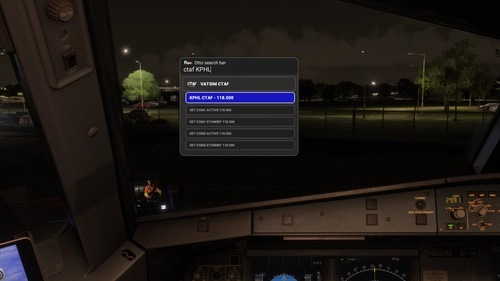
    This Flow Pro widget enables quick lookup of VATSIM Common Traffic Advisory Frequencies. Users can directly auto-tune found frequencies to either COM1 or COM2, including both active and standby channels. If a CTAF is not available, the widget provides an error notification. Designed to streamline radio frequency management during online operations.

    Kwakadilly
    MSFS2020/24
    0.0(0)
    32
    8.8 KB
    1 week ago
    Flow - FAA D-ATIS Look Up

    Flow - FAA D-ATIS Look Up

    This add-on introduces a Flow Pro widget for looking up D-ATIS information for airports within Microsoft Flight Simulator. Users can search for specific airports to retrieve their current D-ATIS data. The tool displays both arrival and departure D-ATIS when available. It offers convenient access to live weather and operational information for flight planning.

    Kwakadilly
    MSFS2020/24
    5.0(1)
    36
    8.3 KB
    1 week ago
    VATSIM Live ATIS for MSFS 2020/2024 - Flow Widget

    VATSIM Live ATIS for MSFS 2020/2024 - Flow Widget

    This add-on provides a Flow widget for Microsoft Flight Simulator 2020/2024 to access live VATSIM text ATIS reports for both departure and arrival airports. Users can manually enter ICAO codes and refresh data without leaving the simulator. The add-on features a clean interface, on-screen ICAO keyboard, and separation of departure and arrival ATIS. Installation is via the Community folder and requires Parallel 42 Flow.

    Gunman5
    MSFS2020/24
    0.0(0)
    63
    15.8 KB
    2 months ago
    Flow Windy Radar Launcher

    Flow Windy Radar Launcher

    This add-on integrates a widget into Flow Pro, enabling users to open a Windy.com map centered on their current aircraft location. The displayed map provides real-time radar showing rainfall and storm activity for direct weather comparison with the simulator. It is compatible with both MSFS 2020 and 2024 and requires the Flow Pro version. The add-on is particularly useful for monitoring weather conditions more precisely than default cockpit equipment.

    Seth2413Seth2413
    MSFS2020/24
    5.0(1)
    250
    8.2 KB
    2 months ago
    Showing 1 - 12 of 83 results