
Description
3/2026 UPDATE: I'm no longer maintaining the application version, but recently made a new web-based version - with a LOT more features!
You can check it out at "SimLetsFly.com"
LetsFly is a proof of concept for a unique flight planning utility. It’s a flight planner for the times you ask yourself; Where should I fly today?
I primarily made it for myself but thought others might find it handy as well. I seemed to get stuck doing the same routes all the way back to FSX. Using this I have explored a lot more areas, which is really cool with this amazing scenery.
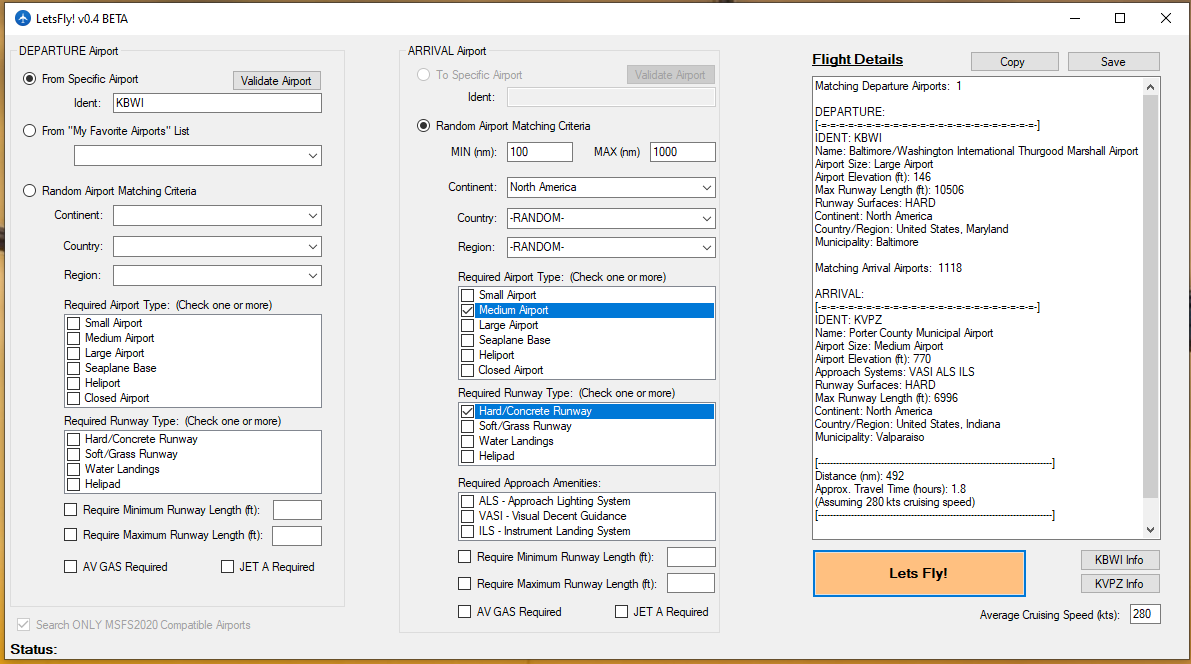
LetsFly is a simple utility for creating interesting random flight plans using user-defined search parameters. Explore new areas, find a flight within a user defined range, find the shortest grass runway in a location to test your skills. Easily save your favorite flight plans, or get detailed information about the airport including weather.
Available Search Parameters:
- Location: Continent / Country / Region / Random
- Range - Within Min and Max nautical miles
- Airport Size: Small, Medium, Large, etc.
- Runway Type: Concrete, Grass, etc.
- Required Airport Length - Min & Max
- Fuel Available
- Available Landing Systems: ALS, VASI, ILS
LetsFly is not a full fledged flight planner and you will need to use other tools for detailed flight planning. LetsFly will give you a possible “journey” how you plan the trip is up to you. All airports should plug into MSFS2020 without an issue, and you can setup your flight from there (VFR/IFR, etc).
Easy to install: Just drag the folder (in the ZIP) to where you would like. Please be sure to have the latest .NET runtime installed. Windows 10 x64 compatible.
LAST UPDATE: V1.2
- Search results now show the bearing to the destination airport. Ex: North, South, etc. Helpful if you want to head a particular direction.
LetsFly
3/2026 UPDATE: I'm no longer maintaining the application version, but recently made a new web-based version. You can check it out at "SimLetsFly.com". LetFly is a versatile flight planning utility for Microsoft Flight Simulator, offering random flight plans based on user-defined search parameters such as location, airport size, runway type, and more.


Avis des utilisateurs
12 avis
Historique des versions
New Feature: - Search results now show the bearing to the destination airport. Ex: North, South, etc. Helpful if you want to head a particular direction. - Starting work on search preset feature - NOT IMPLEMENTED YET
Connectez-vous pour participer à la discussion
Se connecterCommentaires(30)
11 months ago
over 2 years ago
over 2 years ago
I use your software, and would like to add a few more features (for private use only). Do you provide the source code or do you prefer to keep it secret ?
about 4 years ago
Well, I who didn't want a Neofly, an Air manager, a Skyspark, because it was too complete and asked not to use the liners from the start, I find this little software more than perfect. :
over 4 years ago
Love it. Been looking for something like this for a while, just something nice and simple to spit out an airport at me.
almost 5 years ago
I love this, too, Brian, and use it all the time. So much so, that it would be really great if the 'Save' parameters feature could be implemented.
Thanks again
over 4 years ago
Agree. A fantastic app and would be so great to be able to save presets!
about 5 years ago
Great idea! It will be fun for flying between seaplane bases or whatever. I was looking for something to generate a destination. Works great!
over 5 years ago
over 5 years ago
over 5 years ago
over 5 years ago
over 5 years ago
over 5 years ago
over 5 years ago
over 5 years ago
over 5 years ago
But can you add a filter that you can set a maximal flighttime?
over 5 years ago
over 5 years ago
over 5 years ago