

Description
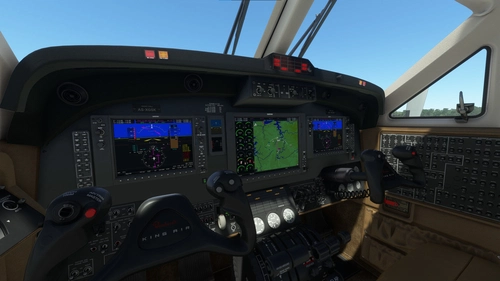
A cockpit mod that swaps out the default King Air 350's screens for Working Title's WT21. If you like flying the King Air but hate the default G3x avionics, this mod is for you. Comes with 2 PFDs, MFD, basic RTU radio tuner and FMC
Installation:
- Extract zip
- Copy folder "husk-PL21-kingair" into community folder
This mod will replace the cockpit model of the default aircraft.
**WARNING: MOD IS NOT COMPATIBLE WITH G1000 COCKPIT MOD. REMOVE G1000 MOD BEFORE USE**
Known issues:
Some add-on liveries are incompatible
Microsoft Flight Simulator © Microsoft Corporation. King Air 350 Pro Line 21 Mod has been created under Microsoft's "Game Content Usage Rules" using assets from Microsoft Flight Simulator, and it is not endorsed by or affiliated with Microsoft.
King Air 350 Pro Line 21 Mod
Enhance your King Air 350 cockpit experience with this mod by Working Title, replacing default screens with WT21 avionics. Includes 2 PFDs, MFD, RTU radio tuner, and FMC. Note: Not compatible with G1000 cockpit mod.


Avis des utilisateurs
40 avis
Historique des versions
Aucun historique de version disponible.
Similaires
King Air 350 G1000 Cockpit Mod
Enhance your King Air 350 experience with this cockpit mod featuring Working Titles G1000 NXi avionics system. Includes 2 PFDs, MFD, autopilot panel, and audio panel to upgrade your cockpit. Some button sounds may be missing, and certain liveries could cause display issues. Installation instructions included.
par Husk

Wembley Stadium
Explore the iconic Wembley Stadium in London, UK, boasting a massive seating capacity of 90,000. This detailed add-on provides a realistic rendition of the largest stadium in the UK, offering a captivating virtual experience for aviation enthusiasts.
par u/Huyster
Connectez-vous pour participer à la discussion
Se connecterCommentaires(134)
about 5 hours ago
13 days ago
But overall the mod is a blast ! I can finnally fly the plane i flew some times IRL.
26 days ago
2 months ago
3 months ago
3 months ago
4 months ago
6 months ago
7 months ago
One question, is there a way to display the V speeds on the pdf's speed band?
8 months ago