
Description
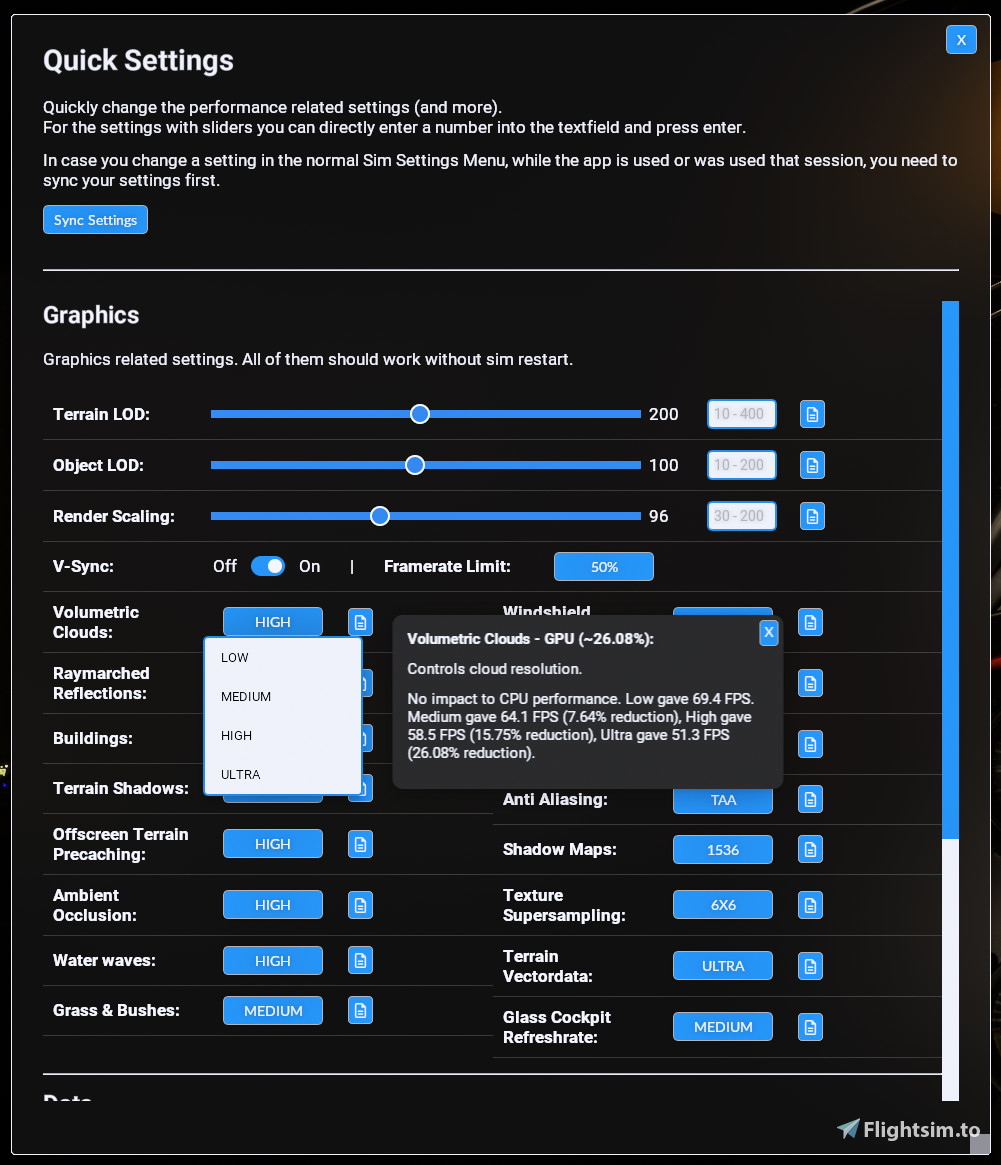
Additionally to my Terrain-LOD changing app i release this full suite, more or less.
Were you ever annoyed you have to stop the sim and immersion just to change something quickly?
Were you ever annoyed that you cannot see what which setting does?
Were you ever annoyed that you dont know if a settings is cpu or gpu demanding?
Are you lazy?
Is your performance bad on the ground but you still want to enjoy good visuals when in air? You might try this app then ^^
Features
- Change many performance realted settings on the fly, without need an immersion breaking ESC to sim settings
- find descriptions and performance tests
- quickly turn on devmode, replay tool and more (in future)
QuickSettings makes it really simple and fast to change the settings that are most performance influencing. For an estimated impact and a settings description you can click that icon next to a setting.
No need to click many times to reach your setting. Also you dont have to click through arrows to reach the option you like, here you can directly select it. Or enter a value into the textbox next to sliders and change LOD values super quick.
You can also find detailed performance tests from TheOriginalBabu in the popup descriptions. For more info about the system they have been made on please visit the original post in the forum here:
Guide in Official MSFS Forum
NOTICE:
Please dont use Photogrammetry switch on the ground. The terrain disappears for a few secds and it can happen (even rarely) that your plane sinks in and lands ontop if all is loaded again.
PS: If you like it please consider rating it and if really generous and its possible for you, a donation would be more than appreciated. :-)
QuickSettings for Flow (p42)
Fine-tune your Flight Simulator settings with QuickSettings for Flow (p42). Easily adjust performance-related settings, access descriptions and performance tests, and enable additional features like devmode and replay tools. Enhance your sim experience with quick and efficient setting adjustments for optimal performance and visual quality.


Avis des utilisateurs
2 avis
Historique des versions
- implemented a small delay for setting initialisation, to not cause issues for lower end PCs If you never had an issue with this app, no reason to install the update. But if you got errors, i.e the app starts in a corrupted state, after doing something in the Sim setting menu or restart flow, you may try this update. It should fix the issue.
Similaires

MSFS Control Profile Backuptool
The MSFS Control Profile Backuptool is a utility designed to help users manage and safeguard their control profiles within Microsoft Flight Simulator. It allows users to identify their existing profiles, create backups, and share configurations with others, assuming compatible hardware is used. The add-on comes with a detailed README for setup and usage instructions, and while community support may be available, it is primarily a user-driven tool. Users are advised to proceed with caution and ensure they are comfortable with its functionality before use.
par Senchay
EDMI-Flugplatz Illertissen
A detailed and accurate representation of EDMI-Flugplatz Illertissen, a small German airfield in South Germany. This add-on includes dynamic features, handcrafted models, and a full PBR airfield in 4k resolution. Enjoy realistic aspects like a runway sign that changes with wind direction and unique objects that appear under specific conditions.
par Senchay
EDMI-Flugplatz Illertissen Ground
Enhance your scenery with EDMI-Flugplatz Illertissen Ground, a complementary package for the Illertissen airfield mod. Please note that this add-on does not include the actual airfield - download link provided separately.
par Senchay
FLOW Terrain-LOD-Quickset (PC)
Quickly adjust your Terrain Level of Detail on PC with FLOW Terrain-LOD-Quickset. Easily switch between high and low LOD settings without pausing your simulation, enhancing your experience in different regions. Note that this tool is only tested on PC and requires double-clicking buttons for changes to take effect. Experience smoother transitions and improved visuals with this convenient plugin.
par Senchay
Connectez-vous pour participer à la discussion
Se connecterCommentaires(8)
about 2 years ago
over 2 years ago
about 2 years ago
Because normally any change in settings llets a small popup appear that tells you settings were saved.
I doubt that happens so maybe they do something completely different and overwrite what i set in this tool.
I use the inhouse msfs settings dialogue, more or less.
over 2 years ago
Currently in VR, it is still reading the 2D settings. Not the dedicated VR settings.
(Pressing on the arrows on the top of the settings)
over 2 years ago
So im not really sure this will happen, siimply because of the second reason. I would have to release it without having tested it.
over 2 years ago
You can simulate the VR mode of MSFS by enabling the Dev-Mode.
Go to Options and there in the Default VR API Setting, you can set it to Fake.
When you now press CTL+Tab (default settings) it will switch to vr mode.
Twaeking in VR is even more important than in 2D :-)
Greetings from Germany,
Sebastian
over 2 years ago
Thank you very much!
over 2 years ago