
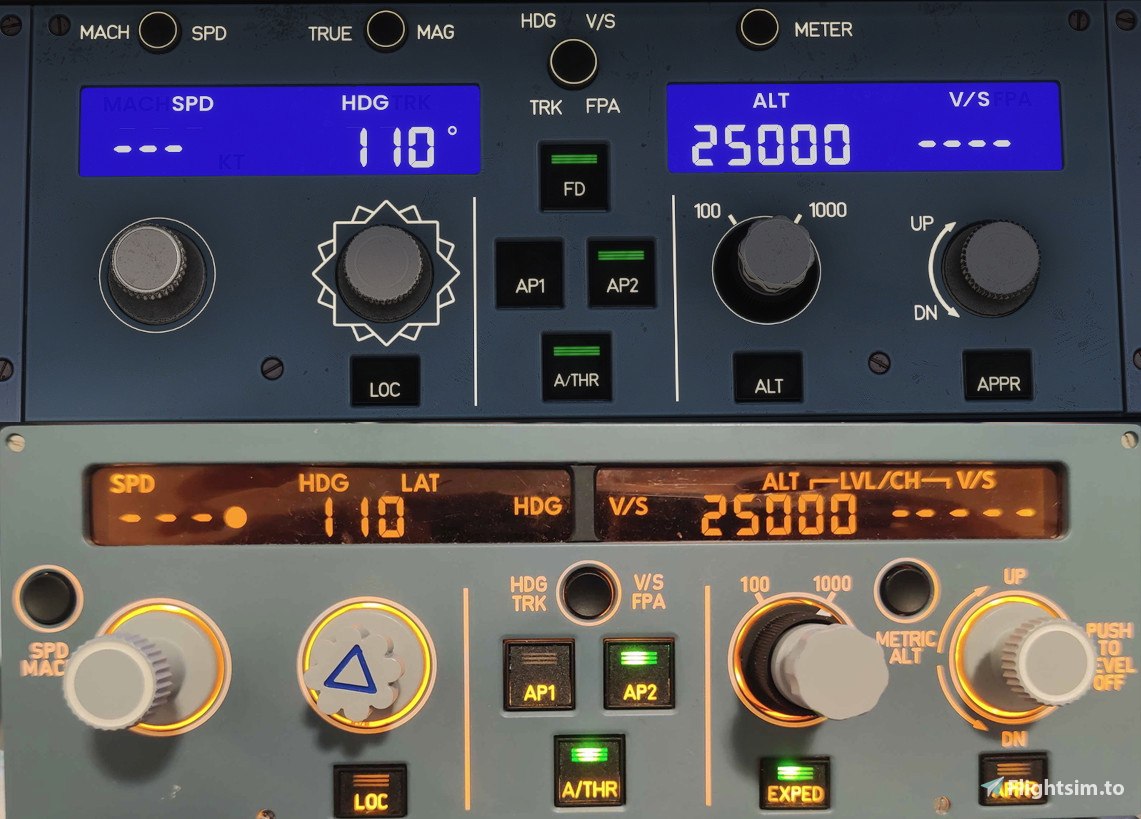
Description
MobiFlight Profile: miniFCU + miniEFIS + miniOVHD for Fly By Wire A380X
Release Notes
2026-02-26: V3.0
Adapted to MobiFlight 10.5.3.23 BETA MFPROJ file format
Fixed some former bugs
Restored compatibility with latest FBW A380 LVARs
Reversed the QNH button function
Added support for miniOVHD
Removed DOT-Versions of the FCU
2025-01-11: V2.1
Adapted to new Firmware with MobiFlight 10.4.0.3.
2025-01-09: V2.0
Added miniEFIS-Support
2024-11-02: V1.0
Initial Release
General notes:
You need the latest beta version of MobiFlight (10.5.3.53) that supports the new .mfproj file format. Also you need with the latest Firmware for the miniFCU (and miniEFIS/miniOVHD if applicable). My V3 profiles will NOT work with the old firmware and not with stable MobiFlight V10.5!!! Again, you REALLY NEED THE LATEST BETA of MobiFlight!
Please checkout the install guide provided by vinKaizen for the miniFCU and miniEFIS firmware: https://flightsim.to/file/67139/fenix-a320-minicockpit-minifcu-mobiflight-profile-quartz-displays-full-installation
A big thanks to him for the implementation of the miniEFIS into MobiFlight!
How to use:
There is only one file: FBW-A380-miniFCU-miniEFIS-miniOVHD.mfproj
It includes configurations in three tabs: one for miniFCU, one for miniEFIS, one for miniOVHD. If you don't own either the miniEFIS or miniOVHD, you can simply delete the corresponding configuration tab by clicking on the respective three dots and select "remove".
How to use:
Mapping of the FCU has been done mostly 1 to 1 to the A320, so I'll refrain from pointing out all function. If you know how to use the FCU in the A320, you basically know how to use it in the A380X. EXPED Button is not mapped to anything, as the ALT button that is on this position in the A380 seems to not be implemented yet in FBW A380, so the button is INOP.
For the miniEFIS, there are some special modifications as the A380 uses different types of rotary switches for the mode and the range and also has two rows of buttons for the EFIS config of the ND. I've tried to make all of the functions accesable by using the ADF/VOR-Switches:
Left switch is used for some mode changes for the EFIS buttons and LS/VV button:
- ADF/VOR 1 set to OFF: Upper row of the EFIS buttons (CSTR/WPT/VORD/NDB/ARPT) is mapped to their respective buttons and LEDs of the EFIS.
- ADF/VOR 1 set to VOR (right): Lower row of the EFIS buttons (VOR1/WX/TERR/TRAF/VOR2) is mapped to the CSTR/WPT/VORD/NDB/ARPT buttons and LEDs of the EFIS.
- ADF/VOR 1 set to ADF (left): The LS button switches function and LED with the VV button.
Right switch is used for some mode changes on the ND range and zoom functions:
- ADF/VOR 2 set to OFF: The range turnknob is mapped 1 to 1 to the ranges on the A380-FCU (10-20-40-80-160-320). Range of 640 is NOT possible to access with the knob, but with a modechange (see next line):
- ADF/VOR 2 set to VOR (right): If the range turnknob is set to 320 (furthest right turn position) and you switch the ADF/VOR 2 switch to VOR, the range will change to 640. As long, as the ADF/VOR 2 switch is set to VOR, the range turnknob will be INOP!!! To go to lower ranges again, set the ADF/VOR 2 switch back to OFF, this will bring the range back to 320 and the turnknob will work again as it should.
- ADF/VOR 2 set to ADF (left): When you switch ADF/VOR 2 switch to ADF, the range turnknob will be INOP. However, the QNH rotary switch can now be used to change the range, going all the way from ZOOM modes to 640. Meaning you can use the OANS zoom functions. QNH cannot be selected while in the ADF/VOR 2 switch is set to ADF. Set the ADF/VOR 2 switch back to OFF to use QNH rotary switch to change QNH and the range turnknob for ranges 10 to 320.
Also, the FBW A380 reversed the function of the push/pull knob for the QNH: PUSH will set the QNH to STD, PULL will set QNH back to local QNH. While in STD mode you can preselect a local QNH, however the preselect-value will not be visible on the miniFCU, only in the simulator.
For the miniOVHD the mapping is done mostly 1-to-1, however there are some minor changes:
- LDG FLAP 3 Button does not exist in the A380, therefore the button and the LED is mapped to the RCDR GND CTL (can be used only on the ground while engines are off)
- ENG AI will turn on anti ice fo all four engines, however the FAULT and ON LED will only observe status of ENG1 anti ice. Mind: the switch works as a toggle, meaning if you set for example engine 1 and 2 anti ice to on and leave 3 and 4 off and then push the ENG AI button on the miniOVHD, ENG 1/2 anti ice will turn off while ENG 3/4 anti ice will turn on.
- EXT PWR will turn on all four external power sources on, however the AVAIL LED and the ON LED will only observe the status of EXT1. Due to some limitations in the available LVARs the AVAIL LED on the miniOVHD will stay on once external power is selected.
- The call button is mapped to all buttons, however you will only hear the DING while the buttons in the overhead panel will not move.
- Strobe, Beacon, Runway Turnoff and Nose Lights are mapped 1-to-1 to the respective switches
- Wing light is not mapped at all
- The NAV&LOGO switch is mapped to both the NAV and the LOGO lights
- - NAV&LOGO switch set to OFF -> NAV and LOGO OFF
- - NAV&LOGO switch set to 1 -> NAV ON and LOGO AUTO
- - NAV&LOGO switch set to 2 -> NAV ON and LOGO ON
- The LAND switch on the A380 has only ON and OFF, so I mapped RETRACTED to OFF and ON to ON. The middle position is not used
- The DOME switch turns the potentiometer:
- - DOME BRT will slowly turn AMBIENT LT turnknob up until it reaches the maximum
- - DOME DIM will stop the movement of the AMBIENT LT turnknob
- - DOME OFF will slowly turn AMBIENT LT turnknob down until it reaches the minimum
- The wiper switch will set both wipers to the respective position
Known Limitations:
- ALT HOLD Button seems to be not yet implemented in A380X, therefore it cannot be mapped to the miniFCU as of today. The button and LED are completely INOP.
- AVAIL LED on the EXT PWR button will stay illuminated, even if the external power is on
If you find any issues, feel free to point them out! You can contact me via PN via flightsim.to or via Discord (nickname "conaly.", your can find me i.e. via the FBW server, Fenix server, MiniCockpit Community server).
FlyByWire A380 miniFCU + miniEFIS + miniOVHD MobiFlight Profile
This add-on provides a MobiFlight profile for the Fly By Wire A380X, incorporating configurations for the miniFCU, miniEFIS, and miniOVHD. Released in version 3.0, it ensures compatibility with the latest MobiFlight BETA and updates functionality for various cockpit controls. Users will benefit from detailed mappings and enhancements tailored to the A380s unique systems. The profile includes guidance on setup and known limitations to assist users in achieving optimal performance.


Avis des utilisateurs
2 avis
Historique des versions
2026-02-26: V3.0 Adapted to MobiFlight 10.5.3.23 BETA MFPROJ file format Fixed some former bugs Restored compatibility with latest FBW A380 LVARs Reversed the QNH button function Added support for miniOVHD Removed DOT-Versions of the FCU
Similaires

Discover Airlines (former Eurowings Discover) D-AIUR Fenix A320 V2
Discover Airlines D-AIUR livery for the Fenix A320 V2B2, meticulously updated by conaly for a realistic flying experience. This 8K texture pack includes detailed external features with wear & tear effects, while maintaining compatibility with V2B2. Explore the updated version with improved painting quality and minor fixes, showcasing the airlines unique design. Install the livery to your community folder and enjoy the immersive visual enhancements for your flights.
par conaly
Aerosoft A340-600 EFB Normal Checklist
This add-on replaces the default procedures checklist in the Aerosoft A340-600 EFB with a simplified and authentic Airbus A340 checklist. Designed for use in Microsoft Flight Simulator, it is compatible with MSFS2024 and likely with MSFS2020. The checklist aims to streamline preflight and inflight procedures while maintaining accuracy. Installation involves overwriting the existing checklist file in the aircraft’s data folder.
par conaly
Connectez-vous pour participer à la discussion
Se connecterCommentaires(18)
over 1 year ago
over 1 year ago
about 1 year ago
almost 2 years ago
almost 2 years ago
Can you elaborate what may have been broken by the latest update? Or can you just check again the profiles if they are working or not?
almost 2 years ago
almost 2 years ago
almost 2 years ago
almost 2 years ago
Will you do a profile also with the miniEFIS?
almost 2 years ago
Edit: And so far, there is not firmware for the miniEFIS to use in MobiFlight. Until there is a new firmware, I cannot create a profile.
almost 2 years ago
almost 2 years ago
almost 2 years ago
almost 2 years ago
almost 2 years ago
almost 2 years ago
almost 2 years ago
https://www.mobiflight.com/
almost 2 years ago