
Description
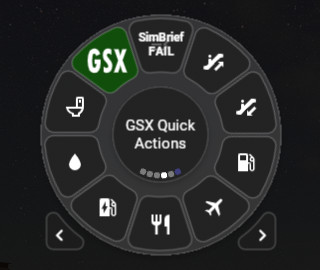
This widget is here to make use of GSX a little bit more pleasant for //42 Flow Pro users. The idea is that you don't have to use a standard GSX menu to call the services and instead just use the buttons in your Flow. They will also provide basic information about the services being requested or performed.
Currently supported GSX features:
- Boarding
- Deboarding
- Prepare for departure (aka Push and Start)
- Refueling
- Catering
- Water
- Lavatory
- GPU
Installation:
Just unzip the file and place the widget folder into you MSFS Community folder or link it with the Addon Linker. Please read the notes section as it may have some specific instructions on how to use this widget or how to resolve some issues.
Notes and issues:
- While calling any GSX function with this widget please give it a time to actually request the service, it usually takes a second or two for the service to be requested.
- In some cases when you request the service and it's blocked by other service that is being performing at the moment (for example you can't call refueling while boarding is in progress) - the widget button will not show that it has been requested nor unavailable.
- When requesting a "Departure" you have to click the button twice with a slight pause in between - first click will request the "prepare for departure" phase from the GSX, this means that the pin will be inserted and tug connected. Once the preparation for pushback is completed (note that GSX does not notify you of this) the widget button will turn into "START PUSHBACK" label and the second click will open up the GSX menu for you to pick the direction for the push. Same button will allow you to interrupt or stop the pushback through the GSX menu. (Hopefully I will be able to improve this feature in the future updates so it won't be that complicated)
- The handler operator choice will be available when any of the services has been called for the first time, through displaying a GSX menu, either after the flight was loaded or you have landed at your destination.
- The SimBrief widget checks if GSX had synced your SimBrief flight plan, and therefore it will show either "FAIL" - if the sync has not been completed for any reason or "OK" - if it has been synced.
- The widget buttons show the current status of service or if it's unavailable the button goes blank.
- When boarding or deboarding using buses and there is more than one bus coming - the passanger counter may show wrong values.
- Sometimes the scripts might fail connecting to GSX in this case buttons will be colored red and display "FAIL", in this case reloading GSX or restarting Couatl will resolve the issue.
- While using this widget GSX may not show the tips (pop up messages at the top corner of the sim).
This project is still work in progress, and I'm not a software developer, so I do my best to make it work, and make it pleasant to use. If you have any suggestions or willing to help - please leave a comment.
GSX Quick Actions for Flow Pro
This add-on features a widget designed to enhance the GSX experience for users of //42 Flow Pro by streamlining service requests. Instead of navigating through the standard GSX menu, users can utilize dedicated buttons to request services such as boarding, deboarding, and refueling. It offers real-time information on the status of requested services and is designed to improve overall ease of use while interacting with GSX functionalities. Installation is straightforward, and the widget provides some specific operational notes to assist users.


Avis des utilisateurs
1 avis
Historique des versions
Aucun historique de version disponible.
Connectez-vous pour participer à la discussion
Se connecterCommentaires(7)
6 months ago
about 1 year ago
over 1 year ago
over 1 year ago
FIXED... your layout.json is wrong... its missing metadata that allows it to be recognised by msfs... fix below
{
"id": "p42-util-flow-eugenesvv-gsx-quick-actions",
"title": "GSX Quick Actions by eugenesvv",
"content": [
{
"path": "ContentInfo/p42-util-flow-eugenesvv-gsx-quick-actions/Thumbnail.jpg",
"size": 6056,
"date": 133886177902180229
},
{
"path": "Flow/templates/p42-util-flow-eugenesvv-gsx-quick-actions.json",
"size": 44154,
"date": 133886177902660493
}
]
}
about 1 year ago
over 1 year ago
over 1 year ago