
Flightsim.to
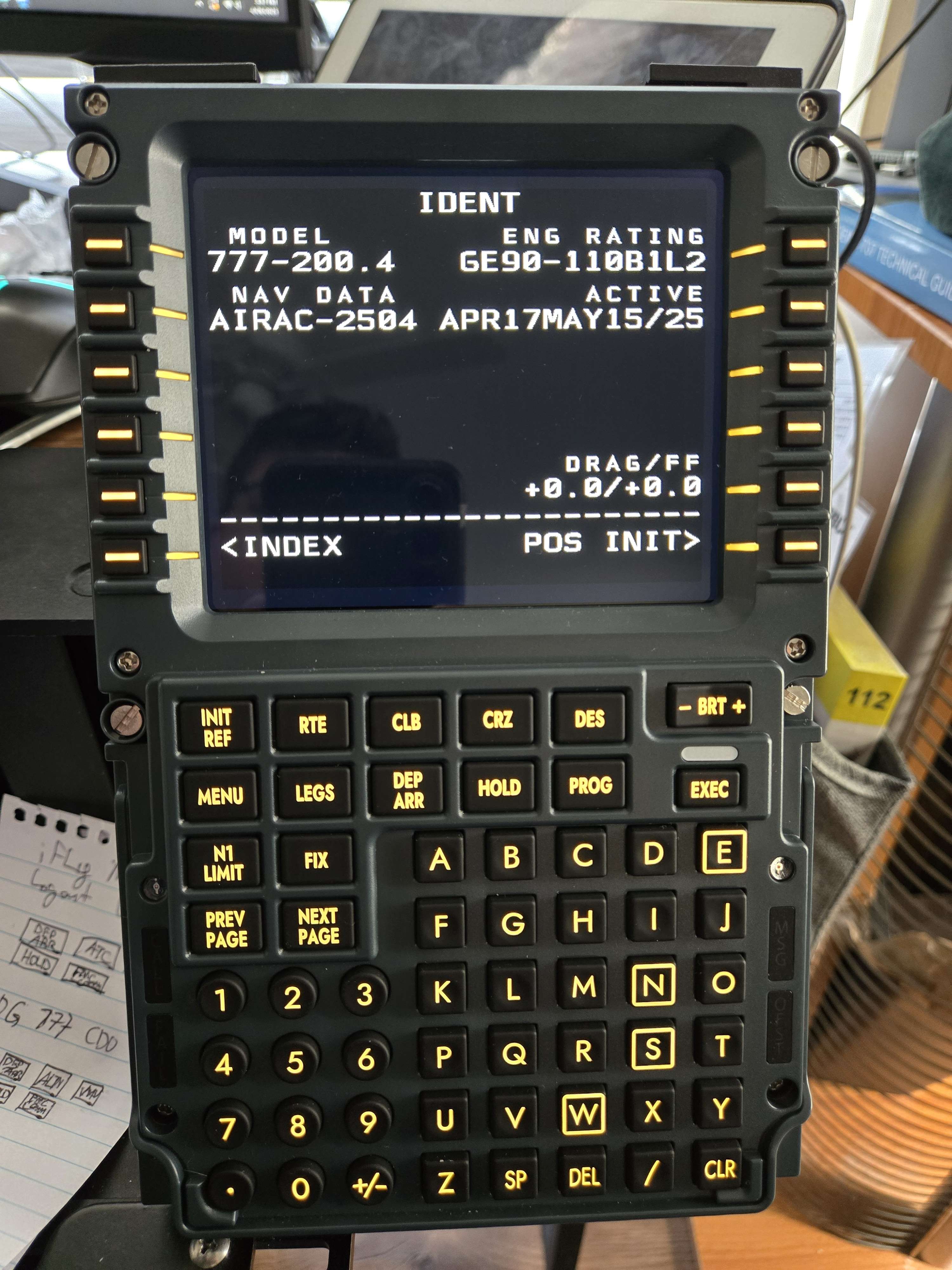
    Winwing PFP 3N Mobiflight Profile for the PMDG 777 (with working display and LED Lights) - Image 1

    Description

    This should be a plug-and-play profile for the PFP 3N. If it is not, you may have to manually configure the buttons, but if you're on the Mobiflight beta and have installed python as directed, it should work.

    This was tested on the PMDG 777F for MSFS 2020 and I assume works for the 777-300ER as well since that's what the profile was made for.

    I will test this once the PMDG 777-200ER is made available in both 2020 and 2024 (Tested and works the same as the 777F and 77W)

    Tested with the 777F in MSFS2024 (Works with lights and display as well)

    ***IMPORTANT***
    For the 777-200ER in MSFS 2020 and 2024, as well as the 777F in 2024, you will need to add the following line:

    [SDK]

    EnableDataBroadcast=1

    EnableCDUBroadcast.0=1

    EnableCDUBroadcast.1=1

    EnableCDUBroadcast.2=2

    To this folder:

    2024 -

    C:\Users[Yournamehere]\AppData\Local\Packages\Microsoft.Limitless_8wekyb3d8bbwe\LocalState\WASM\MSFS2024\pmdg-aircraft-77er\work

    2020 -

    C:\Users\[Yournamehere]\AppData\Local\Packages\Microsoft.FlightSimulator_8wekyb3d8bbwe\LocalState\packages\pmdg-aircraft-77er\work

    You're specifically looking for the 777 Options.ini.

    This is what will get the display to work with this profile.

    YOU MUST LOAD IN THE AIRCRAFT ONCE BEFORE YOU CHANGE THE .INI FILE

    I have zero plans to support this as it's merely a profile, once deprecated, it's deprecated.

    IMPORTANT! - You MUST be on the Mobiflight beta and you must have the python scripts installed as per the guide.

    I've also found that it helps to turn off the APP Installer (to do this, type in Manage App Execution Aliases and find the two Python App Installer Aliases)

    https://docs.mobiflight.com/guides/installing-python/

    NOTE - Only Default Font is supported at this time

    Activité des interactions
    TéléchargementsCommentairesÉchelles distinctes pour les téléchargements et les commentaires
    24 oct. Téléchargements: 1 Commentaires: 025 oct. Téléchargements: 3 Commentaires: 026 oct. Téléchargements: 2 Commentaires: 027 oct. Téléchargements: 4 Commentaires: 1 Retour: 128 oct. Téléchargements: 0 Commentaires: 029 oct. Téléchargements: 1 Commentaires: 030 oct. Téléchargements: 1 Commentaires: 031 oct. Téléchargements: 1 Commentaires: 001 nov. Téléchargements: 0 Commentaires: 002 nov. Téléchargements: 6 Commentaires: 003 nov. Téléchargements: 2 Commentaires: 004 nov. Téléchargements: 2 Commentaires: 005 nov. Téléchargements: 1 Commentaires: 006 nov. Téléchargements: 3 Commentaires: 007 nov. Téléchargements: 2 Commentaires: 008 nov. Téléchargements: 2 Commentaires: 009 nov. Téléchargements: 2 Commentaires: 010 nov. Téléchargements: 0 Commentaires: 011 nov. Téléchargements: 3 Commentaires: 012 nov. Téléchargements: 0 Commentaires: 013 nov. Téléchargements: 0 Commentaires: 014 nov. Téléchargements: 1 Commentaires: 015 nov. Téléchargements: 6 Commentaires: 016 nov. Téléchargements: 4 Commentaires: 017 nov. Téléchargements: 1 Commentaires: 018 nov. Téléchargements: 2 Commentaires: 019 nov. Téléchargements: 2 Commentaires: 020 nov. Téléchargements: 0 Commentaires: 021 nov. Téléchargements: 3 Commentaires: 1 Général: 122 nov. Téléchargements: 0 Commentaires: 0
    24 oct.07 nov.22 nov.
    55
    Téléchargements
    2
    Commentaires
    Dernier commentaire aujourd’hui
    Le créateur répond à 25% des commentaires

    Connectez-vous pour participer à la discussion

    Se connecter

    Commentaires28

    GiesingSimPilot
    Général·about 8 hours ago
    For everyone not getting the LEDs to Work here is how it works :-)
    GiesingSimPilot·about 6 hours ago
    Correction: Make it "If 0 than 0 else then 1"
    spdbr
    Retour·25 days ago
    thanks for this profile. works almost perfectly. Only thing I noticed (in the PMDG 777F) is that the EXEC button not always lights up on the box.
    pbrad74
    Avis·about 1 month ago
    It works. I'd give it 5 starts but like the person below me has stated 5 months ago, the Execute light doesn't light up.
    DarrianCZE·7 months ago
    Hi, the Execute light does not come on when it's supposed to. Is this something you can look into? Thank you!
    evelina·11 months ago
    While PFP 3N appears enabled, it does not synchronize with that of MSFS2020 in the various options.
    alexroffe·11 months ago
    I get 'CDU.PY Terminated. Please Activate Logging VIA Extra - Settings.

    I have done this, but no joy?
    MarcoDesmo27·about 1 year ago
    I downloaded the profile, but with this extension, mobiflight won't load it. Can you help me? Thank you.
    KDBNINER
    ·over 1 year ago
    HI
    You are sure for this line
    EnableCDUBroadcast.2=2

    not =1
    thanks for your profils first
    Stevejb_73
    ·over 1 year ago
    Thanks for creating this. As the button config you have setup is for the 777 FMC, that naturally and perfectly works for the Winwing PFP 7 in MSFS 2024.

    It's taken hours of searching to find a profile for the PFP 7, would be super awesome if you could show this profile as being suitable for the PFP 7, it would same a lot of folks, a lot of effort and stress.

    Thanks
    mach35
    ·over 1 year ago
    Thanks for making & uploading this file, works great with the 777-F & the 777-300ER in both 2020 & 2024

    quick tips, make sure SimAppPro isn't running when you start MobiFlight.
    If it is you need to unplug the FMC usb cable to reset the FMC to allow Mobiflight to work
    zBrqm·over 1 year ago
    Screen works for me, but the buttons dont
    chrischiozza·over 1 year ago
    I have added the SDK lines but the display does not light up. The buttons work fine and this is in 2024. Any ideas?

    Update - It is working on the 777-200 but not the 777-300 release today for 2024. I have the ini updated as best I can tell.
    LeoStixx86·over 1 year ago
    This download gives me a .mfproj file which is not being seen when trying to open it with Mobiflight which all my other profiles are .mcc. How am I to use this profile to get my PFP3N working with the Trip7. Thanks
    boeingtwindriverAuthor·over 1 year ago
    If you noticed towards the bottom of the instructions, I indicate that you need to be on the Mobiflight beta, which uses the .mfproj file format.
    Ram2Scram
    ·over 1 year ago
    5 stars, works perfect on new -200ER also, took minute to add lines to .ini file thanks to your clear and concise instructions! 5/5 stars- glad can use PFP for more than 737! Thanks!
    chrischiozza·over 1 year ago
    My PAP3 does not light up the display, does yours? I added the SDK lines and this is in 2024.
    MSFS 2020MSFS 2024

    Winwing PFP 3N Mobiflight Profile for the PMDG 777 (with working display and LED Lights)

    This add-on provides a plug-and-play Mobiflight profile for the Winwing PFP 3N specifically designed for the PMDG 777 in Microsoft Flight Simulator. It features a working display and LED lights, facilitating an immersive simulation experience. While primarily tested on the PMDG 777F, it is assumed to be compatible with the 777-300ER, pending future compatibility with the 777-200ER. Users are required to be on the Mobiflight beta and to have the appropriate Python scripts installed for optimal functionality.


    Téléchargements2K
    Version1.0
    Taille du fichier5.94 KB
    PubliéIl y a 1 an
    Mis à jourIl y a 1 an

    Avis des utilisateurs

    4.7

    9 avis

    5
    67%
    4
    33%
    3
    0%
    2
    0%
    1
    0%

    Historique des versions

    Aucun historique de version disponible.
    Similaires