

Description
This is an Aer Lingus livery for the Project Mega Pack A330-300. Make sure you have the aircraft installed from the Discord server below.
https://discord.com/invite/megapack
Installation:
- Head to your Microsoft Flight Simulator directory and go inside the Community folder. You can find this folder at 'Microsoft Flight Simulator\Community'.
- Drag and drop the 'PMP_A330_300_Aer_Lingus' folder into the Community folder. DO NOT insert into the PMP_A330_300 folder.
- Load up Microsoft Flight Simulator and select the Airbus A330-300, the Aer Lingus livery should now appear in the selection menu.
Disclaimer:
Airbus and Aer Lingus colours, logos and aircraft are trademarks under their own respective organisations. This is a freeware livery with the aim of adding real-world liveries into Microsoft Flight Simulator. This pack is available for FREE, you should not purchase this pack for any financial transaction.
You can find me on YouTube via the link below.
https://www.youtube.com/drawyah/
Aer Lingus Airbus A330-300 Livery
Aer Lingus livery for Project Mega Pack A330-300, featuring authentic colors and logos. Install it easily to enhance your Microsoft Flight Simulator experience with this free and realistic livery.


Avis des utilisateurs
6 avis
Historique des versions
- Adjustment of tail colouring to match both sides of the plane. - Added additional Aer Lingus Shamrocks to inside of winglets & 2L Door. - EI-EDY St Munchin/Maincin names added below cockpit windows. - Airbus A330 logos added besides doors & below aircraft nose. - Adjustment of tail code positions. - Adjustment of config to correctly call Shamrock callsign on default ATC.
Similaires
![[A32NX] FlyByWire | Airbus A320neo Aer Lingus EI-LRA in 8k](https://cdn.flightsim.to/images/13/UOVAL68y.png?width=500)
[A32NX] FlyByWire | Airbus A320neo Aer Lingus EI-LRA in 8k
Discover the Aer Lingus EI-LRA livery for the Airbus A320neo in stunning 8k quality, now compatible with FlyByWire. This mod features a custom livery design with Aer Lingus logo and country colors, perfect for SimUpdate 8 and beyond. Simply follow the easy installation steps and take to the skies with this vibrant new look. Ready for your next flight adventure!
par Selcuk Dikilitas
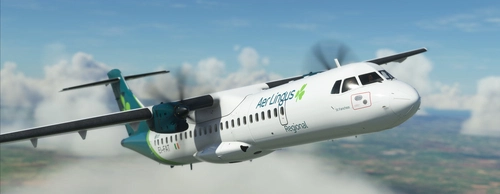
Aer Lingus EI-FAT | Microsoft ATR 72-600
Aer Lingus livery for the Microsoft ATR 72-600, the flagship carrier of Ireland, now available for your virtual flights. This add-on offers a detailed representation of Aer Lingus distinctive livery. Install it easily and elevate your simulation experience today.
par Damo_Designs
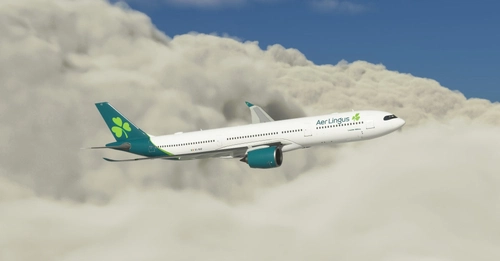
Aer Lingus "2019 livery" Headwind A330-900
Aer Lingus "2019 livery" for the Headwind A330-900. Extract and install in your community folder for a new livery experience. Feel free to share your feedback and join the community on Discord for more liveries. A seamless addition for your virtual flights.
par UnitDeath
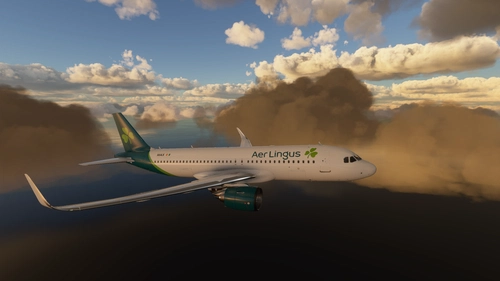
Aer Lingus A320 4K
A high-quality 4K livery of the Aer Lingus A320, specially crafted for your enjoyment. Request your own custom liveries via the dedicated forum link provided in the description. Feel free to share any feedback or suggestions in the comments section. Happy flying with this immersive add-on by Max Menegazzi.
par MaxedOut
Connectez-vous pour participer à la discussion
Se connecterCommentaires(20)
about 5 years ago
Also a great livery, I have both Aer Lingus liveries now.😃
about 5 years ago
Thrilled that you're enjoying it!
over 5 years ago
where can i get this base model, as Discord keeps saying servers too busy
about 5 years ago
https://flightsim.to/file/9147/airbus-a330-300 here u go!
over 5 years ago
Fantastic!
This is what I was looking for! I wanted either the old or new livery for Aer Lingus on the PMP A330. There really isn't anything I can fault this livery. Brilliant!
over 5 years ago
Very awesome. But I have one question, are there templates for third party addons like this? How do you make liveries for aircraft that are not in the sim? Thanks.
over 5 years ago
The Mega Pack Discord server has a texture map available to download for their A330. I used the .psd format for this, but you can also edit through Blender I believe too.
over 5 years ago
Got it, thanks!
over 5 years ago
over 5 years ago
over 5 years ago
over 5 years ago
over 5 years ago
over 5 years ago
over 5 years ago
over 5 years ago
over 5 years ago
over 5 years ago
over 5 years ago
over 5 years ago