
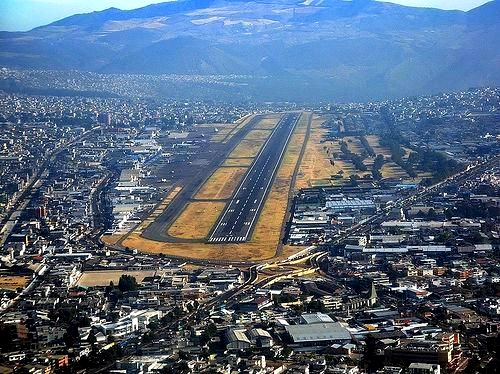
Description
This Enhancement will:
Add:- QMS, UIO, and ZUI navaids (No ILS or marker beacons though, sorry...).
- Add: localizer antenna (3D model only).
- The old grass parts to replace the current satellite imagery.
- An airport rotating beacon light.
- A custom heightmap to the runway.
- The floating street lights that were all over the airport.
- A building that was almost inside the runway.
- The current roads that cross the airport nowadays.
- PAPI lights placed correctly and with the correct glide path angle.
- Custom placed taxiway signs.
Installation:
Step #1: Extract the contents of the .rar file into the Community folder of the simulator.
Step #2: Add the following lines to your Content.xml file:
<Package name="eduardomcfly-sequ-navaids" priority="x"/>
<Package name="eduardomcfly-sequ-quito" priority="x+1"/>
(the "x" needs to be the number that follows the number from the last existing line in the Content.xml file)
Example:
<Package name="eduardomcfly-nir-ndb" priority="x+1"/>--------> The last existing line in the Content.xml
<Package name="eduardomcfly-sequ-quito" priority="x"/>--------> x= The number that follows 1, so x= 2.
<Package name="eduardomcfly-sequ-navaids" priority="x+1"/>--------> x +1 = 3
Recommended add-ons: MSFS2020 Map Enhancement
NOTE #1: I do not model in 3D, so all the scenery models are generic or from a free-to-use library. This means that I'm not able to do a custom terminal that reassembles the original one.
NOTE #2: Sadly I wasn't able to implement the RNAV procedures, ILS, the marker beacons, or the comm frequencies, so for now we'll just have to fly without ATC service, and fly the VOR DME approaches. Sorry if this is disappointing, it is also for me, but it's all I can do for now... :(
Please, if you want to help improve this enhancement pack, don't hesitate to send me a DM!!!
Dépendances
Location
SEQU - Old Mariscal Sucre Intl.
Enhance Old Mariscal Sucre Intl. Airport (SEQU) with new navaids, grass parts, and taxiway signs. Correct PAPI lights and remove floating street lights for a more realistic experience. Simple installation process and compatibility with other add-ons available.


Avis des utilisateurs
1 avis
Historique des versions
1.6 Changelog: *Improved the cargo ramp area. *Re-added the football field next to the airplane museum.
Similaires
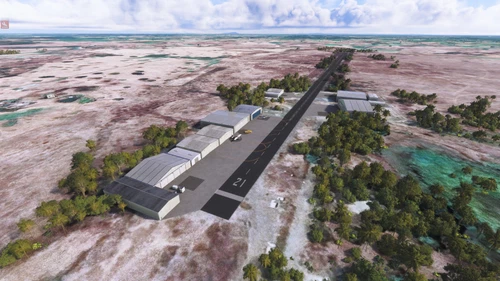
Ecuador Aerodrome Pack
The Ecuador Airfield Pack includes realistic renditions of five airfields located in Ecuador. Featured airfields are Hcda. La Fragua (SEFR), Naturisa (SENT), Manantiales (SEXN), Coaselsa (SEOA), and Pañamao (SEPN), providing a scenic and diverse flying experience. The add-on enhances the Microsoft Flight Simulator environment by adding detailed airports with accurate geographical coordinates. Installation is straightforward, requiring the extraction of files into the Community folder.
par EduMCfly
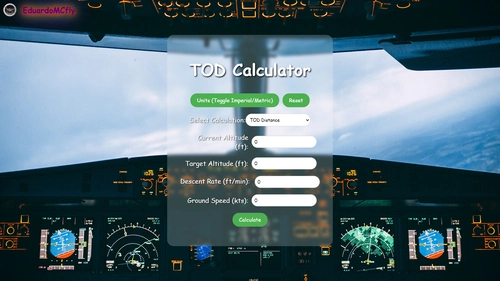
TOD Calculator
Calculate your Top of Descent (TOD) distance or descent rate with the TOD Calculator add-on. Input parameters like altitude, ground speed, and more to get accurate calculations for your flights. Easy-to-use interface and multiple calculation modes make it a must-have tool for flight planning.
par EduMCfly
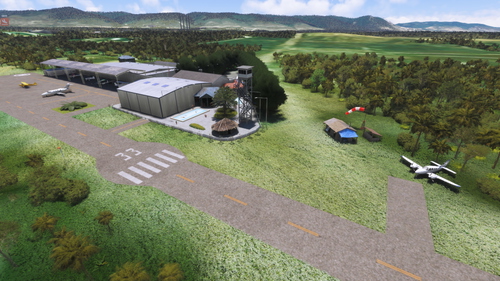
SECZ - Pista Cerro Azul | Club Aerodeportivo Del Ecuador
Experience the Club Aerodeportivo Del Ecuador with the Pista Cerro Azul (SECZ) add-on, located in Puerto Hondo, Guayas Region, Ecuador. This scenery offers a detailed recreation of the clubs runway and surroundings, enhancing your flight simulation experience with visual aids and unique features. Installation is simple - just extract the files into your simulators Community folder and explore this historic location.
par EduMCfly
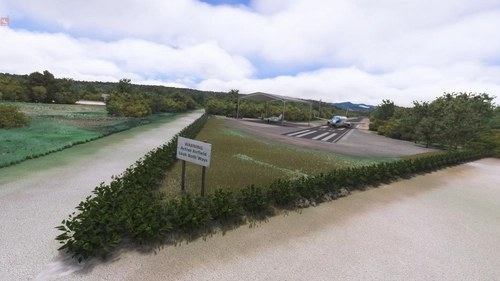
SEML - Pista Manglaralto
Discover Pista Manglaralto (SEML) in Ecuador with its characteristics and operational details like dimensions, surface, and more. Make sure to follow the installation instructions to enhance your flight simulation experience.
par EduMCfly
Connectez-vous pour participer à la discussion
Se connecterCommentaires(30)
about 3 hours ago
Found this post on ms forum:
I wrote this for someone else a little while ago. It works for any airports I edit. I hope you find it helpful:
How to get an ILS correctly ‘set-up’ in MSFS.
Don’t forget to remove ILS from airport exclusion list first.
This technique only works for straight in ILS approaches. Offset ILSs won’t work.
The best place to ‘build’ the ils is spawned in on the runway threshold that the ILS is to be built for.
Initial data
The ‘Friendly name’ should be ILS xx (where xx is the runway concerned)
The frequency should be as published (if an existing ILS)
The ident should be as published (if an existing ILS) NB I-EGT should be entered as IEGT (i.e. no dashes)
Tick enable range and accept defaul value of approx 50000
Tick enable beam width and leave it at 5 degrees
Don’t tick BackCourse
The two other important fields are “Heading” and “Magvar”. These can be calculated from within the sim and do not need external data.
The heading should be the heading display on your cockpit instrumentation as you look down the runway. Ignore any temptation to enter data from other sources! It doesn’t matter if it is slightly out.
To calculate the MagVar, look at the difference between the “heading” used for the ILS and the Heading given under Configuration at the top of the Runway’s properties page, where you are entering the ILS data. Enter that difference (As a positive number) in the MagVar field.
Setting position of components.
Localizer position- Tick ‘edit position’ under ILS Friendly Name. It should spawn a moveable point around about the middle of the runway. Drag it to around ground level at the far end of the runway you are building the ILS for. Eg for an ILS on runway 26, the loacalizer needs to be placed at the 08 runways end, around 100 m or so beyond the threshold but still on the extended runway centre line.
Untick edit position.
If ILS is to have DME, tick DME box. Tick position. Again a point should spawn around about middle of runway. This should be dragged to approximate location of where PAPIs should go on the runway, i.e. close to the threshold of the runway that the ILS is being built for.
A value of 30000 works for range
Tick ‘Has glide slope’
Position the glideslope at the same location as the DME, near where the PAPIs would go. Range for that can also be 30000
The pitch should be as published for the ILS. Most are 3°, but some are different.
For secondary ILS, that is for the ILS on the other end of the runway. Placements of components should be more or less a mirror image of the primary ILS. Range figures can be the same for both primary and secondary. It is just a matter of repeating the process for the Primary ILS.
A quick way to find Heading is to either add or subtract 180° from the primary ILS heading (as long as the value is between 0 and 360. MagVar is the same value.
NB The ident for the secondary ILS needs to be different from the ident for the primary ILS. It should be published.
Voila, you should have a functioning straight in ILS after it is compiled!
Edit: Update- It seems that since SU4 it is now possible to set up offset ILSs using the method above that do get recognised by in sim instrumentation and that will be followed/used by the autopilot.
We also have a old Denver Stapleton scenery that could use ILS approaches.
4 months ago
9 months ago
buuuuuut I'd loooove to see a Version without the Grass textures :-)
about 1 year ago
almost 2 years ago
about 2 years ago
almost 2 years ago
over 2 years ago
over 2 years ago
MS Store version: C:\Users\*your user*\AppData\Local\Packages\Microsoft.FlightSimulator_8wekyb3d8bbwe\LocalCache
over 2 years ago
over 2 years ago
over 2 years ago
over 2 years ago
over 2 years ago
over 2 years ago
over 2 years ago
over 2 years ago
and I've got the asobo airport installed too... should I disable it ?
over 2 years ago
over 2 years ago