
Description
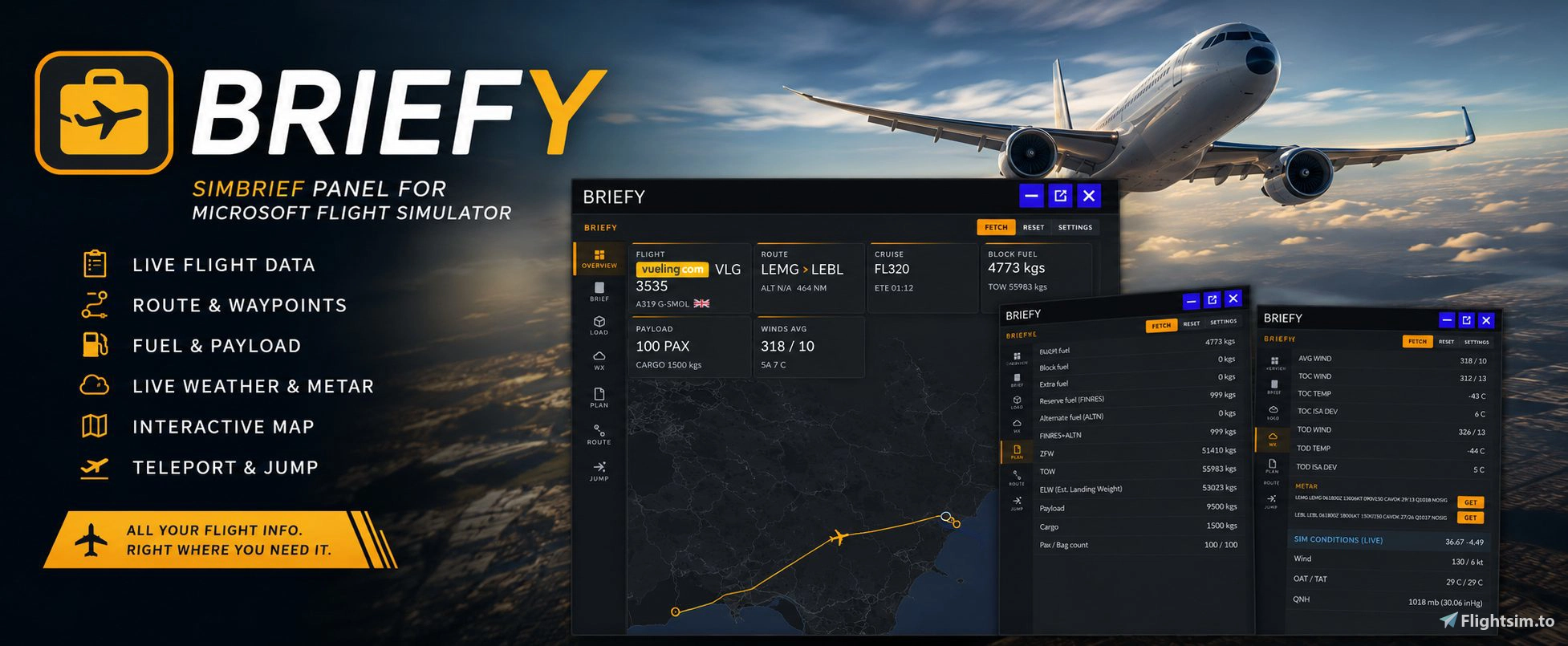
SimBrief OFP viewer, moving route map, live weather, runway and waypoint jumps, facility-based parking, and sim-rate controls—all inside Microsoft Flight Simulator 2024.
Briefy brings your latest SimBrief Operational Flight Plan into the cockpit. Check your flight details, fuel and payload, weather, route and progress without switching to a browser or second screen.
Formerly released as “The Brief Panel.”
What’s new in v2.4.0
- Parking from your installed scenery: PARK now uses MSFS Facility Data as its primary source for gates and stands, replacing OpenStreetMap as the normal parking source. A built-in WASM/SimConnect bridge reads spot positions, directions, types and sizes. OpenStreetMap remains a fallback when facility data is unavailable.
- Better parking jumps: See stand types and spots that fit your aircraft’s wingspan, then jump facing the stand’s recorded direction. Size filtering is a guide, not a clearance guarantee.
- Improved runway jumps: Departure and arrival jumps aim for the start of the selected runway and show “Please wait” while scenery and ground-position data loads.
- More useful route map: Leg distances appear in nautical miles, labels follow your text-size setting, and green top-of-climb and blue top-of-descent markers appear when available in the flight plan.
- New SIM RATE tab: View the current rate and use SLOWER, NORMAL or FASTER controls from 0.25x to 4x.
- Interface polish: Bolder SAVE and CANCEL labels, with the About byline updated to CraigyBabyJ Labs.
Key features
SimBrief OFP integration
Fetch your latest dispatch directly in MSFS, including flight and aircraft details, airports, cruise level, Cost Index, times and routing.
OVERVIEW
Flight progress and fuel-versus-plan at a glance, alongside flight, aircraft, departure, arrival, fuel, payload and wind information.
T/O–LDG
Takeoff data supplied by SimBrief for available runways, including V-speeds, flap and thrust settings. Landing information includes VREF, runway details and SimBrief’s planned landing-distance figures. Changing the selected landing runway lets you compare its available length, but does not recalculate SimBrief’s landing distances. Requires an airframe with performance data configured in SimBrief.
LOAD
Block, extra, reserve and alternate fuel; FINRES + ALTN; ZFW, TOW and estimated landing weight; payload, cargo, passenger and baggage figures.
WX
Plan winds and temperatures, departure and arrival METAR/TAF with individual refresh buttons, plus live conditions read from the simulator.
ROUTE
An interactive moving map with four Esri map styles, labelled waypoints, leg distances, climb/descent markers and an aircraft marker that follows your position and heading.
PLAN
Read the full SimBrief OFP with highlighted sections and adjustable text size.
JUMP
Jump to route waypoints at their planned altitude, edit the target altitude or heading, advance sim time by the planned leg time, or use shortcuts for the next waypoint and top of descent. Departure and arrival jumps target the selected runway.
SIM RATE
See the live simulation rate and slow down, return to normal, or speed up within Briefy’s 0.25x–4x control range.
PARK — experimental
Move to another stand at your current airport. Parking information primarily reflects your installed MSFS scenery; OpenStreetMap is used only as a fallback.
Installation
- Download and extract the latest release ZIP.
- Copy the single
craigybabyj-briefyfolder into your MSFS 2024 Community folder. - Fully restart MSFS, then open Briefy from the in-game toolbar.
Open SETTINGS, enter your SimBrief username or Pilot ID, choose your preferences, press SAVE, then FETCH your latest plan. Settings persist between simulator sessions.
Briefy is for flight simulation only and is not affiliated with Microsoft, Asobo, SimBrief or any airline. Map tiles © Esri. OpenStreetMap fallback data © OpenStreetMap contributors.
🌐 Website — craigybabyj.com
💬 Discord — discord.craigybabyj.com — support, bug reports and updates
🛬 Beat My Landing — beatmyland.ing — Prove it. Perfect it. Beat it.
Briefy — The SimBrief Panel
Briefy is an in-game toolbar panel for Microsoft Flight Simulator providing direct access to your SimBrief Operational Flight Plan in the cockpit. It features a moving map, waypoint teleportation, live METAR and TAF weather data, and real-time in-sim weather information. The addon includes dashboards for flight and fuel planning, interactive route mapping, and multiple customization options. No external devices or browser switching required for flight planning and dispatch integration.


Soutiens

Avis des utilisateurs
8 avis
Historique des versions
Briefy v2.4.2 — hotfix notes (since v2.4.0) - Fixed the SIM RATE buttons so they change the simulator rate and show the live value. The controls now go up to 8x. - Renamed PARK (EXP) to PARKING and gave it a parking-sign icon. - PARKING now checks that the aircraft is on the ground before loading stands or making a parking jump. - Moved T/O - LDG directly below PLAN. - Added a NEXT tab showing “Coming soon.” - Added the installed version number to Settings → About.
Similaires

✈️ MFS Cleaner / Fixer
Clean, fix and maintain Microsoft Flight Simulator 2020 and 2024 with cache cleanup, DLSS management, startup control, MSFS 2024 settings editing, automatic backups and recovery tools.
par CraigyBabyJ
Auto Skip "Ready To Fly"
Auto "Ready To Fly" Skip for Microsoft Flight Simulator 2024 A lightweight quality-of-life mod for Microsoft Flight Simulator 2024 that automatically skips the “Ready to Fly” confirmation screen and takes you straight into the game.
par craigybabyj

Landing Stats + Competitive Leaderboards
BeatMyLanding is a Windows telemetry agent for Microsoft Flight Simulator that provides an in-sim post-landing toast overlay with a detailed landing score. It automatically logs each landing to online leaderboards, tracking performance across global, temporal, and filtered categories. The scoring system uses multiple penalty factors and adjusts for landing difficulty, enabling comparative analysis. A pilot profile, leaderboard filters, and optional Discord integration are also included.
par craigybabyj
MFS2024 Content Wrangler
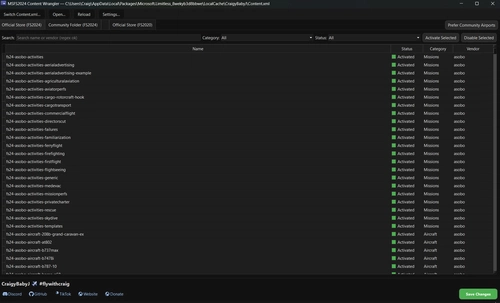
The MFS2024 Content Wrangler is a desktop application designed for managing add-ons in Microsoft Flight Simulator 2024. It provides an organized view of installed packages, complete with features to activate, disable, and filter content easily. Tailored for the Microsoft Store version of the simulator, the tool simplifies package management while ensuring safety through automatic backups and intelligent thumbnail handling.
par CraigyBabyJ
Connectez-vous pour participer à la discussion
Se connecterCommentaires(57)
3 days ago
about 2 hours ago
If you get a chance, check out BeatMyLand.ing too. It’s another project I’ve been working on for flight simmers, focused around your landings and flight stats.
You’re also very welcome to join the Discord server if you want to follow updates, suggest features, report any issues, or just have a chat with other users.
Thanks again for the support, it genuinely means a lot! 🧡
8 days ago
First of all — congratulations on Briefy! I’ve been using the SimBrief Panel for years, and after testing Briefy alongside it for the past month, I think it’s finally time for me to switch. 😄
I really like the direction you’re taking with Briefy, especially the way you’re combining SimBrief data with live MSFS data. With v2.4.0, it’s becoming a seriously capable cockpit tool.
A few ideas for future versions:
• Plan vs Actual — compare SimBrief plan with live MSFS data: fuel, ETA, flight time and distance deviation.
• Fuel prediction — projected fuel at destination vs SimBrief planned fuel.
• “NEXT” page — one compact view showing next waypoint, distance, ETA, altitude, TOC/TOD, and current fuel deviation.
• Post-flight summary — simple OFP vs actual comparison after landing.
I wouldn’t try to turn Briefy into another Navigraph/Little Navmap/Volanta. Its strength is combining SimBrief data with live MSFS data in one cockpit panel.
Keep up the great work — I’m really enjoying where you’re taking this!
Best regards...
8 days ago
Thank you so much for this. It genuinely means a lot, especially knowing you’ve been using the SimBrief Panel for years and have been testing Briefy alongside it for the past month.
You’ve pretty much nailed the direction I want to take Briefy too. I don’t want it to become another Navigraph, Little Navmap or Volanta. I think its sweet spot is taking the SimBrief plan and combining it with what MSFS is actually doing live in the cockpit.
The Plan vs Actual, fuel prediction and post-flight comparison ideas are particularly interesting, and I really like the idea of a compact NEXT page as well.
I’ve added these to my ideas list because there’s definitely some good stuff in there for future versions.
Thanks again for taking the time to write such detailed feedback, and for supporting both the original SimBrief Panel and now Briefy. 😊✈️
CraigyBabyJ
26 days ago
I'm having an issue with the ROUTE tab moving map. All the map tiles are showing a yellow/black "Access blocked - 403" error with the message: "App is not following the tile usage policy of OpenStreetMap's volunteer-run servers".
It looks like OpenStreetMap's servers are blocking the requests due to missing or invalid HTTP headers/User-Agent in the map tile calls. Could you please check this out or add an option to switch map providers in the settings?
Thanks for your great work on Briefy!
25 days ago
Thanks for the detailed report — that's exactly what was happening, and you're not doing anything wrong.
OpenStreetMap started blocking the tile requests coming from the sim. I looked into the user agent angle you mentioned, and interestingly that wasn't it — the requests go through fine with or without a custom one. It looks like their volunteer-run servers were throttling the panel for the volume of tiles it pulls, which is why it worked previously and then suddenly didn't. Either way, OSM's tile policy isn't really intended for a mod distributed this widely, so relying on them was always going to bite eventually.
So the map has moved to Esri, which doesn't require an API key and permits this kind of use. No more blocked tiles.
And your second suggestion is in as well — Settings → Route map now lets you pick between Streets, Dark Gray, Light Gray and Satellite, and your choice is saved between sessions.
I'm pushing the update here tonight. Once it's up, grab the latest and the ROUTE tab should sort itself out — no need to change any settings, it'll default to Streets.
Cheers for the report, and glad you're enjoying Briefy.
25 days ago
23 days ago
about 2 months ago
about 2 months ago
about 2 months ago
about 2 months ago
De todas formas, le echaré un vistazo para la próxima versión y veré qué se puede hacer. ✈️⛽
about 2 months ago
about 2 months ago
about 2 months ago
2 months ago
2 months ago
2 months ago
2 months ago
It should work well with aircraft such as the iniBuilds A350/A340 and PMDG 777, although very complex aircraft can sometimes need a moment after teleporting for the systems, navigation and scenery to catch up properly, use ingame pause while you teleport is recommended.
I’d recommend teleporting in sensible stages rather than making one enormous jump, and always giving the aircraft a little time to stabilise afterwards.
Glad you’re enjoying the addon, and thanks for the kind words! ✈️